Asset tag label template in ZPL
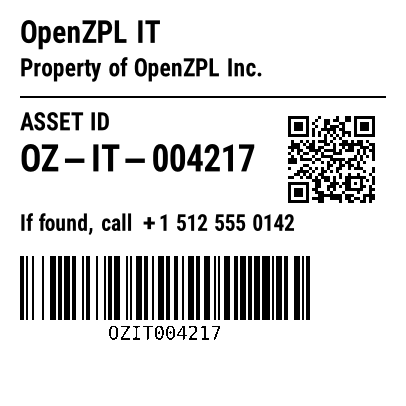
An asset tag in ZPL shows the owner, an asset ID, a QR code linking to the asset's record and a Code 128 barcode of the ID. Copy the 2 × 2 in template below and change the ID and the URL.
Updated 2026-11-01 · Renders made with the OpenZPL engine
Open in the viewerWhat goes on an asset tag
- The owner ("Property of …") and a return contact.
- An asset ID in text, with a Code 128 barcode (
^BC) of it for a scanner. - A QR code (
^BQ) linking to the asset's record in your tracking system. - Size: a 2 × 2 in square fits a laptop or a tool; durable tags also come as small as 2 × 1 in.
2 × 2 in asset tag template
Owner, asset ID, a QR code, a return contact and a Code 128 barcode, laid out for 406 × 406 dots:
^XA
^CI28
^PW406
^LL406
^FO20,20^A0N,30,30^FDOpenZPL IT^FS
^FO20,58^A0N,24,24^FDProperty of OpenZPL Inc.^FS
^FO20,96^GB366,2,2^FS
^FO20,112^A0N,24,24^FDASSET ID^FS
^FO20,144^A0N,36,36^FDOZ-IT-004217^FS
^BY2,2,10
^FO288,106^BQN,2,3^FDQA,https://openzpl.com/asset/004217^FS
^FO20,214^A0N,22,22^FDIf found, call +1 512 555 0142^FS
^BY2,2,64
^FO20,256^BCN,64,Y,N,N^FDOZIT004217^FS
^XZ
The QR code encodes a URL to the asset's record (^FDQA,https://…^FS); point it at your own system. Keep the barcode data and the printed ID the same.
Render it from your code
curl https://api.openzpl.com/v1/printers/8dpmm/labels/2x2/0/ \
  --data-binary @label.zpl > label.png
Every template on this page renders through the same API. Send the ZPL as the request body and get a PNG or PDF back; see the API docs and ZPL to PDF.
Questions
Should an asset tag use a QR code or a barcode?
Both work. A Code 128 barcode scans fast on a handheld; a QR code holds a URL to the asset record and scans from a phone. The template has both so either reader works.
How do I link the QR code to my system?
Put your URL in the QR field: ^BQN,2,5^FDQA,https://your-system/asset/<id>^FS. The QA, prefix sets the error-correction and input mode; see QR code.