ZPL text prints rotated or sideways
ZPL rotates a text field by the orientation letter in ^A: N normal, R 90°, I 180° and B 270°. A field whose ^A leaves the letter out takes the default from ^FW, so one ^FWR turns every such field sideways.
已更新 2026-10-20 · Renders made with the OpenZPL engine
Open in the viewerWhat you see
Text you expected horizontal prints vertically or upside down, or a field you meant to rotate stays horizontal.
^FWR, and a field without an orientation
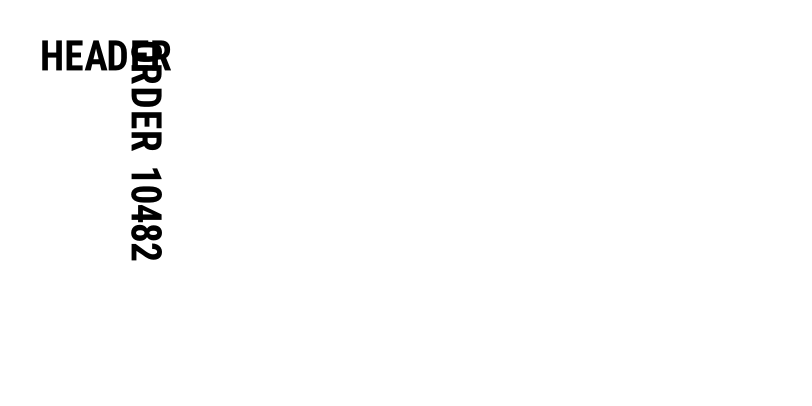
^XA
^FWR
^FO40,40^A0N,40,40^FDHEADER^FS
^FO120,40^A0,40,40^FDORDER 10482^FS
^XZ
Orientation set in each ^A

^XA
^FWR
^FO40,40^A0N,40,40^FDHEADER^FS
^FO40,110^A0N,40,40^FDORDER 10482^FS
^XZ
Why it happens
In the label above, HEADER says ^A0N and stays horizontal. ORDER 10482 says only ^A0,40,40: no orientation, so it takes the field default set by ^FW, which is R. Templates copied between projects often carry a ^FW nobody remembers.
| Letter | Rotation | Text reads |
|---|---|---|
| N | 0° | left to right |
| R | 90° clockwise | top to bottom |
| I | 180° | upside down |
| B | 270° | bottom to top |
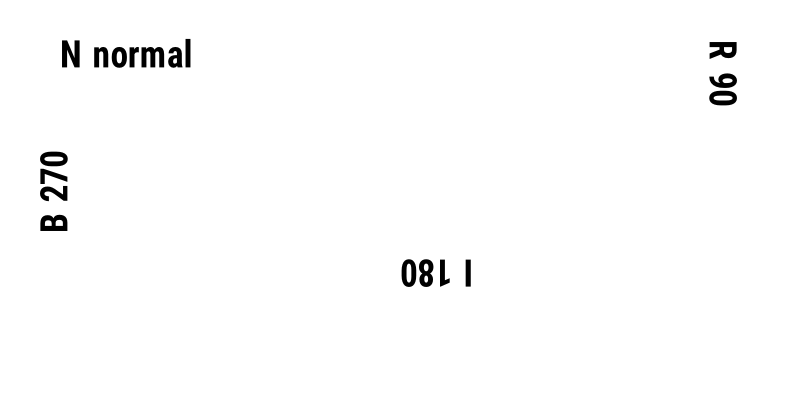
^XA
^FO60,40^A0N,36,36^FDN normal^FS
^FO700,40^A0R,36,36^FDR 90^FS
^FO400,250^A0I,36,36^FDI 180^FS
^FO40,150^A0B,36,36^FDB 270^FS
^XZ
The fix
Write the orientation in every ^A: ^A0N,40,40 for normal text, ^A0R,40,40 for text along the right edge. Then a ^FW elsewhere in the file can't change it.
When you rotate a field, its ^FO position is still the top-left corner of the area the rotated text occupies. Rotated text grows downwards (R) or upwards (B) from there, so leave room in that direction.
To find a stray ^FW, search the file for it, including stored formats recalled with ^XF: a ^FW inside a stored format applies to the fields that follow it. Writing the letter in every ^A makes the label independent of any default set earlier in the stream.
The whole label upside down
If every field is rotated 180°, it is not ^A: look for ^POI (print orientation inverted) in the ZPL, or a printer setting. On the printer the label can also come out reversed because of how the roll is loaded; that is a media question, not ZPL.
Rotation is fully defined by the ZPL, so the preview shows the same orientation the printer uses. Barcodes rotate the same way, with their own orientation parameter, and also follow ^FW.
问题
How do I rotate a barcode in ZPL?
With the orientation parameter of the barcode command, for example ^BCR for a Code 128 rotated 90°. A barcode without it follows ^FW too.
Can ZPL rotate text by 45 degrees?
No. ZPL text and barcodes rotate in steps of 90° only. For other angles, print the text as an image with ^GF.