ZPL text overlaps or runs off the label
ZPL text overlaps when the gap between two ^FO y positions is smaller than the font height, and runs off the label when a line is wider than the space left. Space lines by at least the font height, and wrap long data with ^FB and more than one line.
Aktualisiert am 2026-10-20 · Renders made with the OpenZPL engine
Open in the viewerWhat you see
Two lines print on top of each other, or a long address is cut at the right edge.
30 dots between 50 dot lines; long line cut
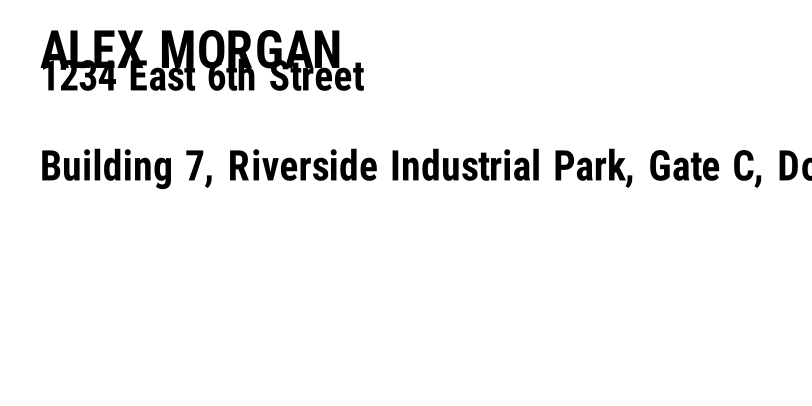
^XA
^FO40,30^A0N,50,50^FDALEX MORGAN^FS
^FO40,60^A0N,40,40^FD1234 East 6th Street^FS
^FO40,150^A0N,40,40^FDBuilding 7, Riverside Industrial Park, Gate C, Dock 4^FS
^XZ
Spaced lines; long line wrapped
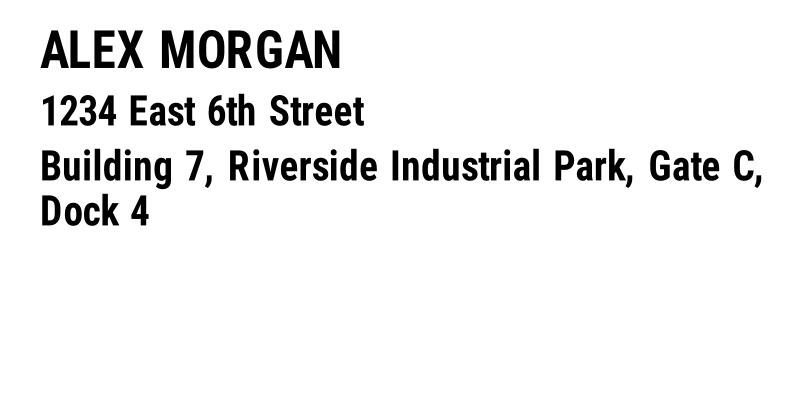
^XA
^FO40,30^A0N,50,50^FDALEX MORGAN^FS
^FO40,95^A0N,40,40^FD1234 East 6th Street^FS
^FO40,150^A0N,40,40^FB733,2,5,L^FDBuilding 7, Riverside Industrial Park, Gate C, Dock 4^FS
^XZ
Why it happens
- Vertical gap smaller than the font. ZPL places each field independently at its ^FO position and never moves one to make room for another. A 50 dot font at y = 30 occupies 30 to 80, so a field at y = 60 lands inside it.
- Variable data longer than the space. A template tested with
John Smithbreaks with a longer name or address. ZPL doesn't wrap plain fields: the text continues past the edge and the part off the label isn't printed. - A different density than designed. Text designed at 203 dpi and printed at 300 dpi stays the same number of dots but the positions keep their dots too; mixing scaled and unscaled values in a template causes overlaps.
The fix
Make the gap between two lines at least the height of the first one, plus a few dots of air. For a 50 dot line at y = 30, the next one starts at y = 95 or lower.
For data whose length you don't control, use a field block: ^FB with a width, a maximum number of lines and a line spacing. The text wraps inside the block:
^FO40,150^A0N,40,40^FB733,2,5,L^FDBuilding 7, Riverside Industrial Park, Gate C, Dock 4^FS
Reserve the height of every line the block can use (here 2 × 40 + 5 dots) before the next field. If the text needs more lines than allowed, a printer overprints the extra text on the last line, so size the block for your longest real value or shorten the data.
How to check
- Render the template with the longest values in your data, not with sample values.
- In the ZPL viewer, the preview at the printer's density shows overlaps exactly: positions and sizes are in dots, so they don't change between preview and print.
Fragen
Does ZPL move a field when it overlaps another?
No. Every field is drawn at its own position; ZPL has no layout engine. Overlaps are always a matter of coordinates and sizes.
How do I know how wide a line of text will be?
Roughly 0.5 to 0.6 times the font height per character for font 0. Render the longest value to be sure, and leave a margin.