ZPL text prints too small or the wrong size
ZPL text size comes from the height and width in dots in ^A, or from ^CF when ^A leaves them out. A field with no size falls back to the font's default, which for the bitmap fonts is tiny; give every field an explicit size, like ^A0N,40,40.
Updated 2026-10-20 · Renders made with the OpenZPL engine
Open in the viewerWhat you see
Text comes out much smaller than designed, stretched, or a different size on one printer than on another.
^AD with no size, and 20 dot text
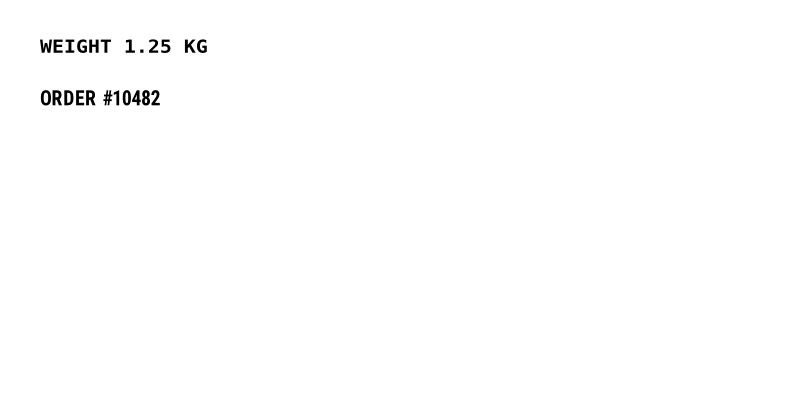
^XA
^FO40,40^AD^FDWEIGHT 1.25 KG^FS
^FO40,90^A0N,20,20^FDORDER #10482^FS
^XZ
Sizes set in dots
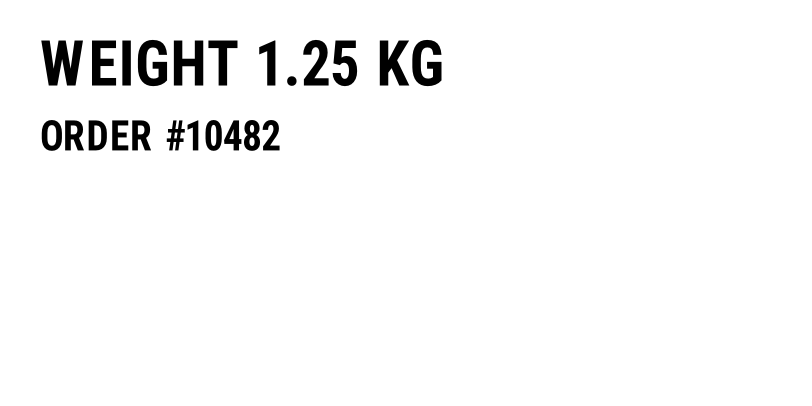
^XA
^FO40,40^A0N,60,60^FDWEIGHT 1.25 KG^FS
^FO40,120^A0N,40,40^FDORDER #10482^FS
^XZ
Why it happens
- No size in
^A.^ADNwithout height and width uses font D's native size, 18 × 10 dots. On a 203 dpi printer that is about 2 mm tall. - Sizes in points, not dots.
^A0N,20,20is 20 dots, not 20 points. At 203 dpi 20 dots is 2.5 mm, roughly 7 points. To convert, height in dots = points × dpi / 72: 12 pt is 34 dots at 203 dpi and 50 at 300 dpi. - A different density. Dots are physical. A label designed at 300 dpi and printed at 203 dpi prints every font about a third larger; the other way round, a third smaller. See 203 vs 300 dpi.
- Width and height don't match.
^A0N,60,20prints condensed text,^A0N,30,90wide text. Font 0 scales freely; set both numbers to the same value for normal proportions.
The fix
Give every text field its size in ^A, in dots, computed for the density you print at:
^FO40,40^A0N,60,60^FDWEIGHT 1.25 KG^FS
^FO40,120^A0N,40,40^FDORDER #10482^FS
If most fields use the same font, set it once with ^CF, for example ^CF0,40, and override only the ones that differ. A field with ^A0N and no numbers takes its size from ^CF.
Scalable font or bitmap font
Font 0 is scalable: any height and width work. Fonts A to H are bitmap fonts with a native size; asking for another size multiplies the native size by a whole number, so ^ADN,40,20 may print slightly smaller than 40 dots. Use font 0 when the exact size matters.
Renderer or printer?
Text size is set entirely by the ZPL, so a preview at the right density shows the size the printer will use. One printer difference is the font itself: font 0 on a real printer is a licensed Zebra font, and the OpenZPL engine draws it with a similar condensed font, so line lengths can differ by a few dots. Leave a margin at the end of long lines.
Questions
What font size is 9 pt in ZPL?
About 25 dots at 203 dpi (9 × 203 / 72) and 38 dots at 300 dpi. Use ^A0N,25,25 or ^A0N,38,38.
Why does the same ZPL print bigger on another printer?
The other printer has a lower density. Dots are fixed physical points, so the same number of dots covers more paper at 203 dpi than at 300 dpi.