ZPL barcode doesn't scan
A ZPL barcode that doesn't scan usually has no quiet zone, bars too thin for the printer, or data the symbology rejects. Leave 10 narrow bars of blank space on each side, use ^BY2 or more at 203 dpi, and check the data and check digit; a preview can't prove a code scans.
Aktualisiert am 2026-10-20 · Renders made with the OpenZPL engine
Open in the viewerWhat you see
The scanner beeps on other labels but not on this one, scans it only sometimes, or reads a different number than the one you sent.
^BY3: too wide, cut at the edge
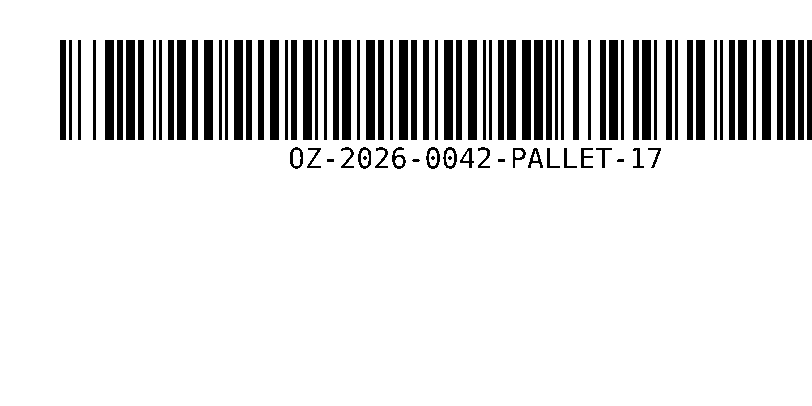
^XA
^BY3,3,100
^FO60,40^BCN,100,Y,N,N^FDOZ-2026-0042-PALLET-17^FS
^XZ
^BY2 with a quiet zone
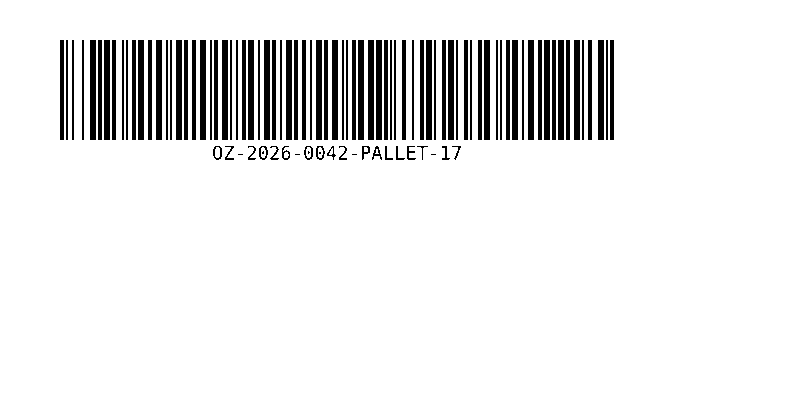
^XA
^BY2,3,100
^FO60,40^BCN,100,Y,N,N^FDOZ-2026-0042-PALLET-17^FS
^XZ
Causes you can see in the ZPL
- The barcode doesn't fit. Width grows with the data and with the module width of ^BY. Above, 22 characters at
^BY3run past the right edge: the end of the code is missing and no scanner can read it. - No quiet zone. Scanners need blank space before and after the bars, at least 10 times the narrow bar width for Code 128. A barcode at x = 0, or touching a box line, often fails. See quiet zone.
- Bars too thin.
^BY1makes the narrow bar one dot: 0.125 mm at 203 dpi. Many printers and scanners can't keep that consistent. Use^BY2or more at 203 dpi,^BY3at 300 dpi. - Invalid data or check digit. Each symbology accepts only some characters and lengths. EAN-13 takes 12 digits and computes the 13th; if you send 13 digits with a wrong check digit, the OpenZPL engine prints the correct one instead, and the scanned number no longer matches your database. See check digit.
The fix
Fit the barcode to the label with a module width the printer can print, and keep blank space around it:
^BY2,3,100
^FO60,40^BCN,100,Y,N,N^FDOZ-2026-0042-PALLET-17^FS
If the data is long, shorten it or move to a 2D code: a QR code or Data Matrix holds the same data in much less space. To see the width before printing, render it in the Code 128 generator.
Causes only the printer can show
A preview draws perfect black bars. On paper, bars spread or thin out:
- Darkness too high fattens the bars and fills the gaps; too low leaves them broken. Print a test at a few darkness values.
- Print speed too high for the media blurs bars, especially in the print direction.
- A worn or dirty printhead leaves thin white lines through every bar: a dead dot. Rotate the barcode so the line runs along the bars, or clean or replace the head.
- Label stock with a glossy or textured face can confuse some scanners.
Fragen
How wide will my Code 128 barcode be?
About 11 modules per character plus 35 for start, check and stop, times the ^BY width in dots. 22 characters at ^BY2 is roughly 554 dots, 2.7 inches at 203 dpi. Code 128 subset C packs two digits per character.
Why does the scanned number differ from the data I sent?
Either the symbology added or replaced a check digit (EAN, UPC), or the data contains characters that the encoding changes. Compare the human-readable line under the bars with your data.