ZPL text is not centered
ZPL centers text only inside a field block: ^FB with justification C centers each line within the block width, starting at the ^FO position. To center on the label, start at x = 0 and make the block as wide as the label, for example ^FO0,y^FB812,1,0,C at 203 dpi on a 4 inch label.
2026-10-20에 업데이트됨 · Renders made with the OpenZPL engine
Open in the viewerWhat you see
Text that should sit in the middle of the label is to the left of center, or each line of an address starts at the same x instead of being centered. The guide line in the renders below marks the true center of a 4 inch label.
Block 600 dots wide: centered on x = 300
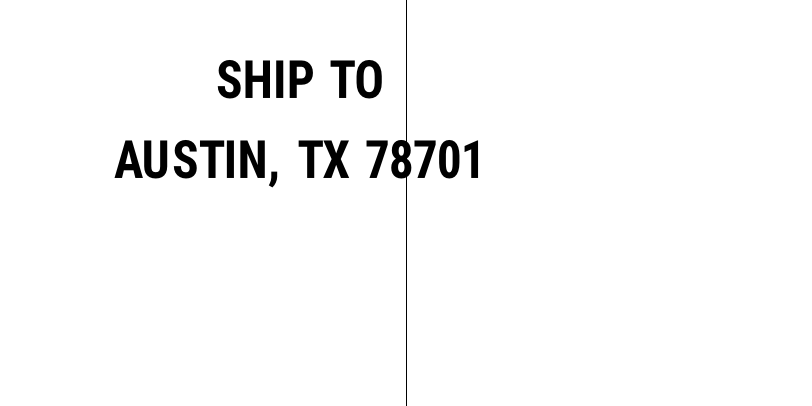
^XA
^FO406,0^GB1,406,1^FS
^FO0,60^A0N,50,50^FB600,1,0,C^FDSHIP TO^FS
^FO0,140^A0N,50,50^FB600,1,0,C^FDAUSTIN, TX 78701^FS
^XZ
Block as wide as the label

^XA
^FO406,0^GB1,406,1^FS
^FO0,60^A0N,50,50^FB812,1,0,C^FDSHIP TO^FS
^FO0,140^A0N,50,50^FB812,1,0,C^FDAUSTIN, TX 78701^FS
^XZ
Why it happens
There are three usual causes, and each leaves a different mark:
- No
^FBat all. A plain^FOfield starts at its x position whatever its length. Every line starts at the same x, so lines of different length don't share a center. - The block is not the label width.
^FBcenters inside its own width. A 600 dot block starting at x = 0 centers text on x = 300, not on the middle of an 812 dot label. Every line is centered, but on the wrong axis. - The block starts somewhere else. With
^FO40,y^FB733, the block covers 40 to 773 and its center is 406: fine. With^FO100,y^FB812, the center moves 100 dots right.
The first case is what you get when you compute the x by hand for one string and then the data changes:

^XA
^FO406,0^GB1,406,1^FS
^FO300,60^A0N,50,50^FDSHIP TO^FS
^FO300,140^A0N,50,50^FDAUSTIN, TX 78701^FS
^XZ
The fix
Use ^FB and make the block cover the area you want to center on. For the whole label the block width is the label width in dots, and the block starts at x = 0. Label width in dots is inches × dpi: 812 at 203 dpi and 1218 at 300 dpi for a 4 inch label (see label sizes).
^FO0,60^A0N,50,50^FB812,1,0,C^FDSHIP TO^FS
The 1 is the maximum number of lines. If the text can be longer than the block, raise it and the text wraps, each line centered. A \& in the data forces a line break.
When the preview is centered but the print isn't
- Trailing spaces. They are part of the field data. The OpenZPL engine ignores them when centering; if your printer shifts the line left, strip spaces from the data before sending it.
- The printer's label width. If
^PWis missing, the printer uses its own setting. A block centered on 812 dots looks off on a printer configured for a narrower width. Put ^PW in the label. - Label shift on the printer. A
^LSor a label top/left offset set on the printer moves everything; check the printer's configuration label.
질문
How do I right-align text in ZPL?
Use R as the justification of ^FB: ^FO0,y^FB792,1,0,R puts the end of each line 20 dots from the right edge of an 812 dot label.
Why does my centered text wrap onto a second line I didn't ask for?
The text is wider than the block. Either make the font smaller, widen the block, or allow more lines; with one line allowed, the extra text is not printed where you expect.