A ^ or ~ in the data cuts the ZPL field short
A ^ or ~ inside ^FD data starts a new command, so the text stops there and the rest of the field is lost. Add ^FH before ^FD and write the characters as hex: _5E for ^ and _7E for ~.
Updated 2026-10-20 · Renders made with the OpenZPL engine
Open in the viewerWhat you see
A field prints only up to a certain character. Area: 4 m^2 (approx. ~4.3) prints as Area: 4 m and everything after it is gone. Sometimes the label also behaves oddly further down, because the printer tried to run what followed as a command.
Why it happens
^ and ~ are the two command prefixes of ZPL. The printer doesn't know that ^2 is part of your text: it reads it as the start of a command, ends the field data there, and discards what it can't parse. Data from users, product catalogues or addresses can contain either character.
^ in the data ends the field
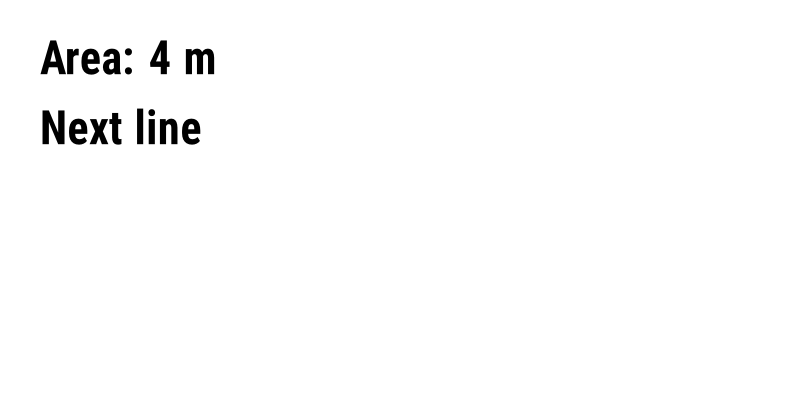
^XA
^FO40,40^A0N,45,45^FDArea: 4 m^2 (approx. ~4.3)^FS
^FO40,110^A0N,45,45^FDNext line^FS
^XZ
Escaped with ^FH
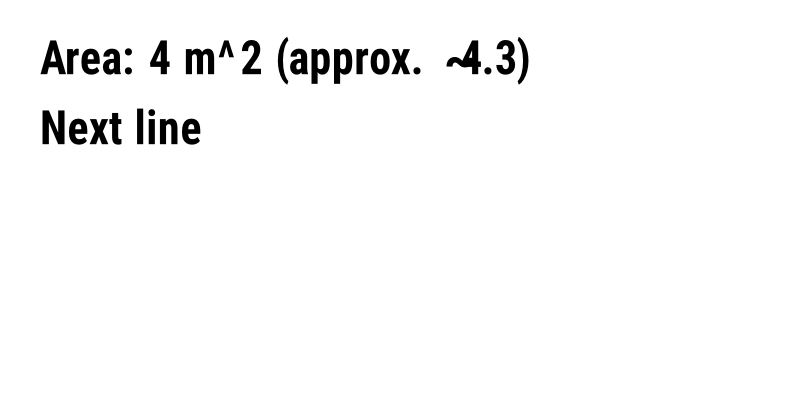
^XA
^FO40,40^A0N,45,45^FH^FDArea: 4 m_5E2 (approx. _7E4.3)^FS
^FO40,110^A0N,45,45^FDNext line^FS
^XZ
The fix
^FH turns on hexadecimal escapes for the next ^FD. An underscore followed by two hex digits is replaced by that byte:
| Character | Escape with ^FH | Notes |
|---|---|---|
^ | _5E | Caret, the format command prefix |
~ | _7E | Tilde, the control command prefix |
_ | _5F | Needed only when ^FH is on, because _ is then the escape |
é (UTF-8) | _C3_A9 | Any byte works, with ^CI28 for UTF-8 |
Escape the data in your code, not by hand. In most languages it is one replace call per character, run on the field value before you put it in the template. Replace _ first, then ^ and ~, so you don't escape your own escapes.
def zpl_field(text):
    return (text.replace("_", "_5F")
                .replace("^", "_5E")
                .replace("~", "_7E"))

zpl = "^XA^FO40,40^A0N,45,45^FH^FD" + zpl_field(value) + "^FS^XZ"
If your data often contains underscores, pick another escape character: ^FH\ makes the backslash the escape, so \5E is a caret and _ prints as it is.
How to check
- Paste the field into the ZPL viewer: the syntax colouring shows where the field data stops.
- Search your data for
^and~before printing a batch. A label template that works with test data can still break on a real product name.
This one is not a printer problem: the engine and the printer parse the same bytes, so the preview shows exactly where the field is cut.
Questions
Does ^FH apply to every field after it?
No. ^FH applies to the next ^FD only. Put it in each field that may contain escaped data.
Can I escape the characters with a backslash instead?
Only if you choose it: ^FH\ makes \ the escape character for that field, so you write \5E for a caret. ZPL has no default backslash escape.