50 × 30 mm labels in ZPL
A 50 × 30 mm label is exactly 400 × 240 dots at 8 dpmm (203 dpi) and 600 × 360 dots at 12 dpmm (300 dpi). Use ^PW400 and ^LL240, and send the size 1.9705x1.1823 to get a 400 × 240 image at 8 dpmm.
2026-10-20에 업데이트됨 · Renders made with the OpenZPL engine
Open in the viewer50 × 30 mm at each print density
| Printer | dpmm | Exact dpi | ^PW | ^LL | dpi the API uses | Image for 1.969x1.181 (px) |
|---|---|---|---|---|---|---|
| 152 dpi | 6 | 152.4 | 300 | 180 | 152 | 299 × 179 |
| 203 dpi | 8 | 203.2 | 400 | 240 | 203 | 399 × 239 |
| 300 dpi | 12 | 304.8 | 600 | 360 | 304 | 598 × 359 |
| 600 dpi | 24 | 609.6 | 1200 | 720 | 609 | 1199 × 719 |
Which size to send to the API
50 mm is 1.9685 in and 30 mm is 1.1811 in. The API multiplies inches by a whole dpi (203 at 8 dpmm) and rounds down, so 1.969x1.181 gives 399 × 239: one column and one row short of the label, and anything drawn there is cut. Send the size rounded up to four decimals for your density (measured):
| 밀도 | Send | Image (px) |
|---|---|---|
| 8 dpmm (203 dpi) | 1.9705x1.1823 | 400 × 240 |
| 12 dpmm (300 dpi) | 1.9737x1.1843 | 600 × 360 |
curl https://api.openzpl.com/v1/printers/8dpmm/labels/1.9705x1.1823/0/ \
  --data-binary @label.zpl > label.png
Starter template
50 × 30 mm is a common size for product and price labels. This template has a name, a date and an EAN-13 barcode:
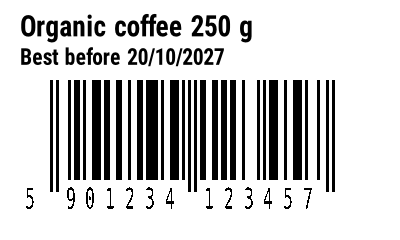
^XA
^CI28
^PW400
^LL240
^FO20,15^A0N,28,28^FDOrganic coffee 250 g^FS
^FO20,48^A0N,22,22^FDBest before 20/10/2027^FS
^BY3,2,100
^FO50,80^BEN,100,Y,N^FD590123412345^FS
^XZ
The EAN-13 uses ^BY3: its bars are 285 dots wide, about 114% of the nominal retail size, and leave room for the quiet zones in the 400 dots of this label. ^BY2 would be narrower but below the 80% minimum for retail scanning. See EAN-13 in ZPL.
^PW and ^LL are the size in millimetres times the dots per millimetre, rounded down, because they take whole dots. The printer names round the density: a "300 dpi" printer prints 12 dots per millimetre, which is 304.8 dpi. The API sizes its image the way Labelary does: inches times a whole number of dots per inch (152, 203, 304 or 609), rounded down. That is why the image can be a dot or two smaller than ^PW and ^LL. Try other sizes with the label size calculator.
Coordinates in ZPL are dots, so a layout made for one density prints at another size on a different printer. See 203 vs 300 dpi before sending the same ZPL to both.
질문
What are ^PW and ^LL for a 50x30 mm label?
^PW400 and ^LL240 at 8 dpmm (203 dpi); ^PW600 and ^LL360 at 12 dpmm (300 dpi).