100 × 150 mm labels in ZPL
A 100 × 150 mm label is exactly 800 × 1200 dots at 8 dpmm (203 dpi) and 1200 × 1800 dots at 12 dpmm (300 dpi). Start the ZPL with ^PW800 and ^LL1200. The API takes inches: send 3.9409x5.9114 to get an 800 × 1200 image at 8 dpmm.
Aktualisiert am 2026-10-20 · Renders made with the OpenZPL engine
Open in the viewer100 × 150 mm at each print density
| Printer | dpmm | Exact dpi | ^PW | ^LL | dpi the API uses | Image for 3.937x5.906 (px) |
|---|---|---|---|---|---|---|
| 152 dpi | 6 | 152.4 | 600 | 900 | 152 | 598 × 897 |
| 203 dpi | 8 | 203.2 | 800 | 1200 | 203 | 799 × 1198 |
| 300 dpi | 12 | 304.8 | 1200 | 1800 | 304 | 1196 × 1795 |
| 600 dpi | 24 | 609.6 | 2400 | 3600 | 609 | 2397 × 3596 |
^PW and ^LL come out in whole dots because the densities are whole dots per millimetre: 100 mm × 8 dpmm is 800 dots, with nothing to round. The image is another matter: the API takes inches and multiplies them by a whole dpi (203 at 8 dpmm, not 203.2), so the plain conversion of 100 × 150 mm, 3.937x5.906, gives 799 × 1198 at 8 dpmm.
Content in the missing column or rows is not in the image. We drew a box up to x = 799 on a ^PW800 label and requested 3.937x5.906 at 8 dpmm: the image is 799 dots wide, so the last column of the box (x = 799) and the last two rows of the label were cut. Keep a margin of a few dots, or send the inch size below that gives the full width.
Which size to send to the API
To get the full 800 × 1200 dots, send the size rounded up to four decimals for the density you print at. No single value is exact at every density; the ones below were measured:
| Dichte | Send | Image (px) |
|---|---|---|
| 8 dpmm (203 dpi) or 24 dpmm (600 dpi) | 3.9409x5.9114 | 800 × 1200 / 2400 × 3600 |
| 6 dpmm (152 dpi) or 12 dpmm (300 dpi) | 3.9474x5.9211 | 600 × 900 / 1200 × 1800 |
curl https://api.openzpl.com/v1/printers/8dpmm/labels/3.9409x5.9114/0/ \
  --data-binary @label.zpl > label.png
Starter template
100 × 150 mm is a common parcel label size outside North America. This template fits 800 × 1200 dots:
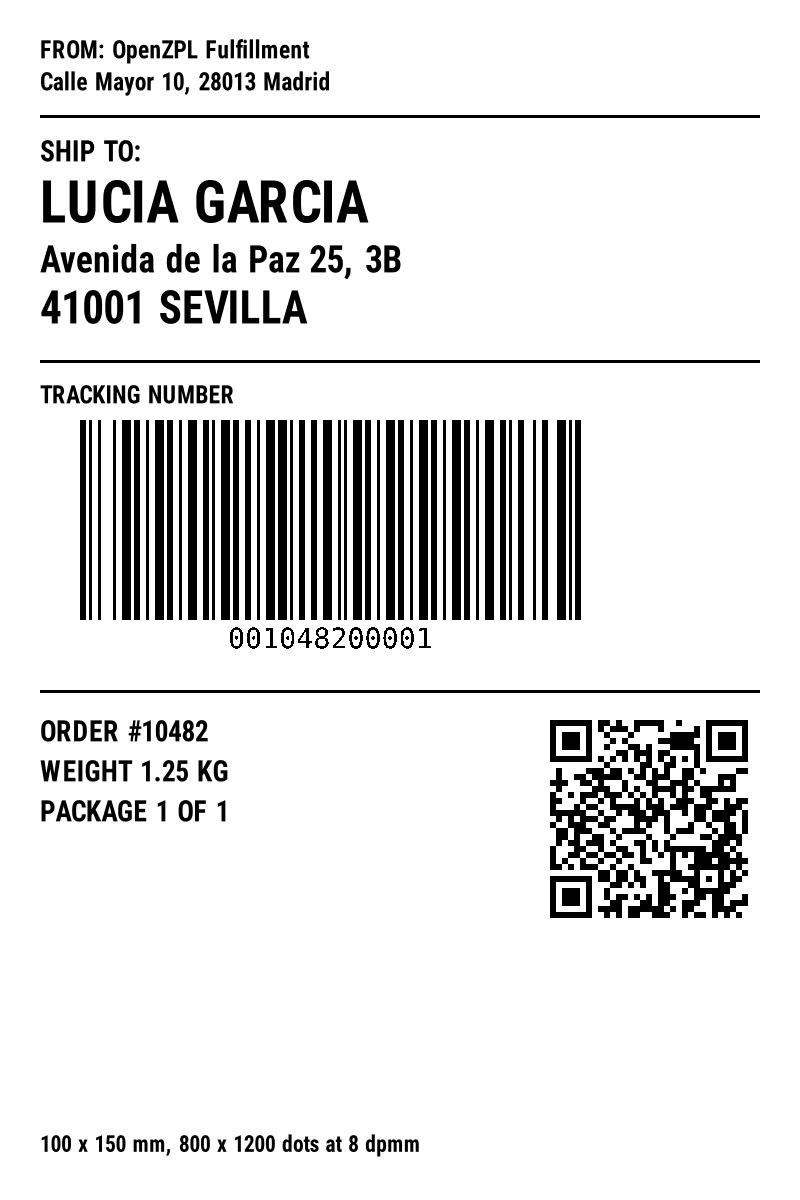
^XA
^CI28
^PW800
^LL1200
^FX Sender
^FO40,40^A0N,24,24^FDFROM: OpenZPL Fulfillment^FS
^FO40,72^A0N,24,24^FDCalle Mayor 10, 28013 Madrid^FS
^FO40,115^GB720,3,3^FS
^FX Recipient
^FO40,140^A0N,28,28^FDSHIP TO:^FS
^FO40,180^A0N,56,56^FDLUCIA GARCIA^FS
^FO40,245^A0N,36,36^FDAvenida de la Paz 25, 3B^FS
^FO40,290^A0N,44,44^FD41001 SEVILLA^FS
^FO40,360^GB720,3,3^FS
^FX Tracking barcode
^FO40,385^A0N,24,24^FDTRACKING NUMBER^FS
^BY3,3,200
^FO80,420^BCN,200,Y,N,N^FD001048200001^FS
^FO40,690^GB720,3,3^FS
^FX Reference and QR
^FO40,720^A0N,28,28^FDORDER #10482^FS
^FO40,760^A0N,28,28^FDWEIGHT 1.25 KG^FS
^FO40,800^A0N,28,28^FDPACKAGE 1 OF 1^FS
^BY2,2,10
^FO550,710^BQN,2,6^FDQA,https://openzpl.com/label-sizes/100x150-mm/^FS
^FO40,1135^A0N,22,22^FD100 x 150 mm, 800 x 1200 dots at 8 dpmm^FS
^XZ
^PW and ^LL are the size in millimetres times the dots per millimetre, rounded down, because they take whole dots. The printer names round the density: a "300 dpi" printer prints 12 dots per millimetre, which is 304.8 dpi. The API sizes its image the way Labelary does: inches times a whole number of dots per inch (152, 203, 304 or 609), rounded down. That is why the image can be a dot or two smaller than ^PW and ^LL. Try other sizes with the label size calculator.
Coordinates in ZPL are dots, so a layout made for one density prints at another size on a different printer. See 203 vs 300 dpi before sending the same ZPL to both.
Fragen
What are ^PW and ^LL for a 100x150 mm label?
^PW800 and ^LL1200 at 8 dpmm (203 dpi); ^PW1200 and ^LL1800 at 12 dpmm (300 dpi).
Can I give ZPL coordinates in millimetres?
Yes, with ^MUM; see ^MU. Most labels are written in dots, which is what this table gives.