100 × 100 mm labels in ZPL
A 100 × 100 mm label is exactly 800 × 800 dots at 8 dpmm (203 dpi) and 1200 × 1200 dots at 12 dpmm (300 dpi). Use ^PW800 and ^LL800, and send the size 3.9409x3.9409 to get an 800 × 800 image at 8 dpmm.
Aktualisiert am 2026-10-20 · Renders made with the OpenZPL engine
Open in the viewer100 × 100 mm at each print density
| Printer | dpmm | Exact dpi | ^PW | ^LL | dpi the API uses | Image for 3.937x3.937 (px) |
|---|---|---|---|---|---|---|
| 152 dpi | 6 | 152.4 | 600 | 600 | 152 | 598 × 598 |
| 203 dpi | 8 | 203.2 | 800 | 800 | 203 | 799 × 799 |
| 300 dpi | 12 | 304.8 | 1200 | 1200 | 304 | 1196 × 1196 |
| 600 dpi | 24 | 609.6 | 2400 | 2400 | 609 | 2397 × 2397 |
100 mm is 3.937 in, but the API multiplies inches by a whole dpi (203 at 8 dpmm) and rounds down, so 3.937x3.937 gives a 799 × 799 image: the last column and row of the label are cut. Send the size rounded up to four decimals for your density (measured):
| Dichte | Send | Image (px) |
|---|---|---|
| 8 dpmm (203 dpi) or 24 dpmm (600 dpi) | 3.9409x3.9409 | 800 × 800 / 2400 × 2400 |
| 6 dpmm (152 dpi) or 12 dpmm (300 dpi) | 3.9474x3.9474 | 600 × 600 / 1200 × 1200 |
curl https://api.openzpl.com/v1/printers/8dpmm/labels/3.9409x3.9409/0/ \
  --data-binary @label.zpl > label.png
Starter template
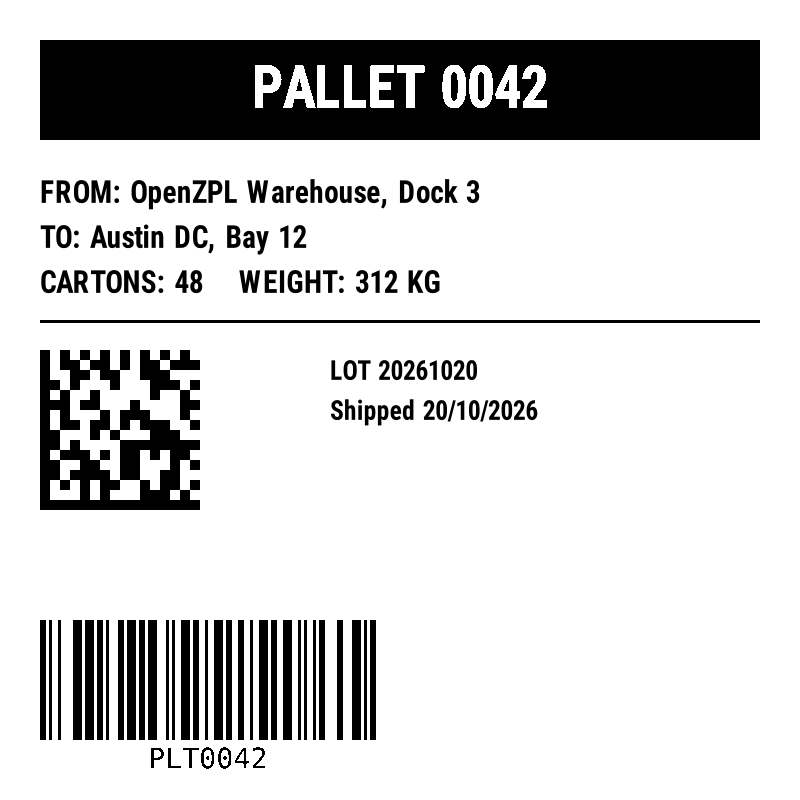
Square labels are used on cartons and pallets, where a reverse-printed header, a few lines of text and a 2D code need to be read from a distance. This template fits 800 × 800 dots:
^XA
^CI28
^PW800
^LL800
^FO40,40^GB720,100,100^FS
^FO40,65^A0N,56,56^FB720,1,0,C^FR^FDPALLET 0042^FS
^FO40,180^A0N,30,30^FDFROM: OpenZPL Warehouse, Dock 3^FS
^FO40,225^A0N,30,30^FDTO: Austin DC, Bay 12^FS
^FO40,270^A0N,30,30^FDCARTONS: 48    WEIGHT: 312 KG^FS
^FO40,320^GB720,3,3^FS
^FO40,350^BXN,10,200^FDPLT-0042-20261020^FS
^FO330,360^A0N,26,26^FDLOT 20261020^FS
^FO330,400^A0N,26,26^FDShipped 20/10/2026^FS
^BY3,3,120
^FO40,620^BCN,120,Y,N,N^FDPLT0042^FS
^XZ
The header is a filled ^GB box with the text printed over it with ^FR (field reverse), so the text comes out white. The Data Matrix uses 10 dots per module.
^PW and ^LL are the size in millimetres times the dots per millimetre, rounded down, because they take whole dots. The printer names round the density: a "300 dpi" printer prints 12 dots per millimetre, which is 304.8 dpi. The API sizes its image the way Labelary does: inches times a whole number of dots per inch (152, 203, 304 or 609), rounded down. That is why the image can be a dot or two smaller than ^PW and ^LL. Try other sizes with the label size calculator.
Coordinates in ZPL are dots, so a layout made for one density prints at another size on a different printer. See 203 vs 300 dpi before sending the same ZPL to both.
Fragen
What are ^PW and ^LL for a 100x100 mm label?
^PW800 and ^LL800 at 8 dpmm (203 dpi); ^PW1200 and ^LL1200 at 12 dpmm (300 dpi).
How do I print white text on a black box?
Draw the box with ^GB and print the text over it with ^FR, as in the header of this template.