ZPL at 203 dpi vs 300 dpi
ZPL coordinates are in dots, so the same ZPL prints about a third smaller on a 300 dpi printer than on a 203 dpi one: 12 dots per millimetre instead of 8. Either rewrite the coordinates for the new density or add ^MUD,200,300 at the start of the label to scale them.
Aktualisiert am 2026-10-20 · Renders made with the OpenZPL engine
Open in the viewerSame ZPL, two printers
The box below is 560 dots wide in both renders. At 203 dpi that is 70 mm; at 300 dpi it is 46.7 mm, because each dot is smaller. The label is 4 × 2 in in both.
8 dpmm (203 dpi)
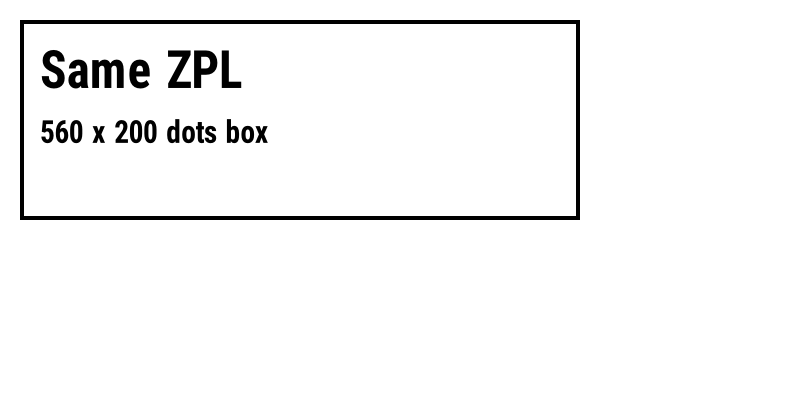
^XA
^FO20,20^GB560,200,4^FS
^FO40,50^A0N,50,50^FDSame ZPL^FS
^FO40,120^A0N,30,30^FD560 x 200 dots box^FS
^XZ
12 dpmm (300 dpi)
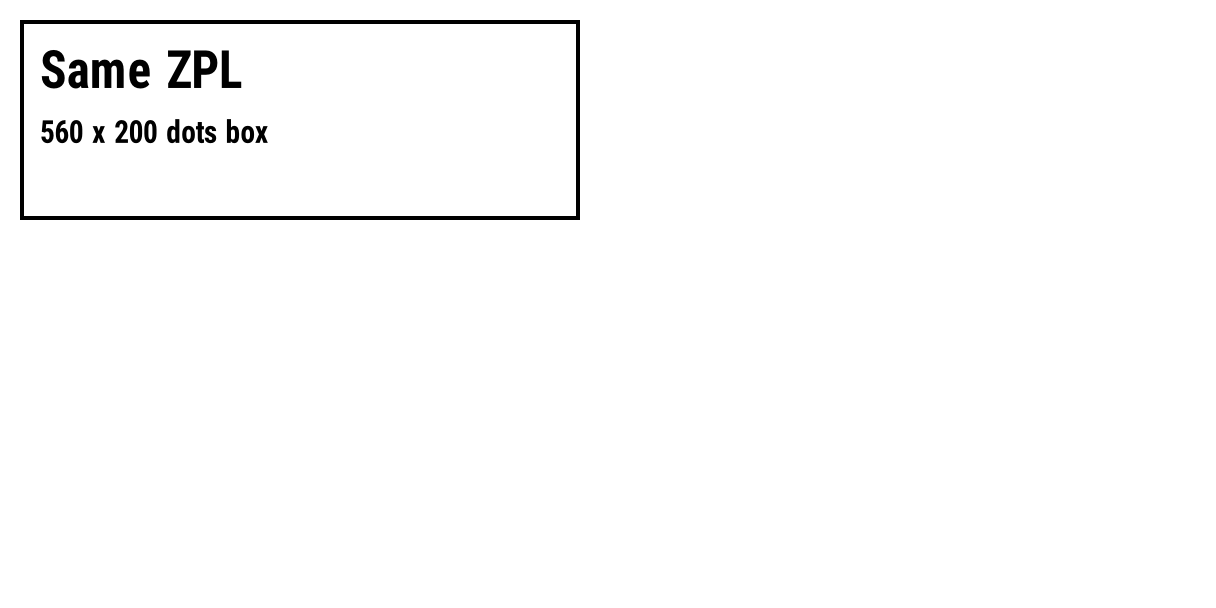
^XA
^FO20,20^GB560,200,4^FS
^FO40,50^A0N,50,50^FDSame ZPL^FS
^FO40,120^A0N,30,30^FD560 x 200 dots box^FS
^XZ
Exact densities
Printers are named by rounded dpi, but they are built in dots per millimetre (dpmm), and the OpenZPL API, like Labelary's, takes dpmm. The exact dpi is dpmm × 25.4:
| Printer sold as | dpmm | Exact dpi | One dot |
|---|---|---|---|
| 152 dpi | 6 | 152.4 | 0.167 mm |
| 203 dpi | 8 | 203.2 | 0.125 mm |
| 300 dpi | 12 | 304.8 | 0.083 mm |
| 600 dpi | 24 | 609.6 | 0.042 mm |
So "300 dpi" is really 304.8. Computing dots with 300 instead of 304.8 drifts by 1.6%: 29 dots across a 6 in label.
Label sizes in dots
Dots = millimetres × dpmm, from the exact density. ^PW and ^LL take whole dots, so round down:
| Label | 6 dpmm | 8 dpmm | 12 dpmm | 24 dpmm |
|---|---|---|---|---|
| 4 × 6 in (101.6 × 152.4 mm) | 609 × 914 | 812 × 1219 | 1219 × 1828 | 2438 × 3657 |
| 4 × 2 in (101.6 × 50.8 mm) | 609 × 304 | 812 × 406 | 1219 × 609 | 2438 × 1219 |
| 2 × 1 in (50.8 × 25.4 mm) | 304 × 152 | 406 × 203 | 609 × 304 | 1219 × 609 |
| 100 × 150 mm | 600 × 900 | 800 × 1200 | 1200 × 1800 | 2400 × 3600 |
The size of the rendered image
The image the API returns follows a different rule, the same one Labelary uses: it counts whole dpi, 152, 203, 304 or 609 (dpmm × 25.4, rounded down), and multiplies them by the size in inches, rounding down again. So a 4 × 6 in label at 8 dpmm comes back as 812 × 1218 pixels, and at 12 dpmm as 1216 × 1824, slightly fewer than the physical dots above. Measured on the engine:
| Label | 6 dpmm | 8 dpmm | 12 dpmm | 24 dpmm |
|---|---|---|---|---|
| 4 × 6 in | 608 × 912 | 812 × 1218 | 1216 × 1824 | 2436 × 3654 |
| 4 × 2 in | 608 × 304 | 812 × 406 | 1216 × 608 | 2436 × 1218 |
| 2 × 1 in | 304 × 152 | 406 × 203 | 608 × 304 | 1218 × 609 |
One dot is one pixel, so a layout that uses every dot of the first table can lose its last row or column in the image: with ^LL1219 on a 4 × 6 in label at 8 dpmm, dot row 1218 falls outside the 1218-pixel image (rows 0 to 1217). Keep a margin of a few dots at the edges.
The label size pages have more sizes and a calculator.
Fix 1: scale the label with ^MU
^MUD,200,300 tells the printer the coordinates were written for 200 dpi and should be scaled to 300. Put it right after ^XA. In the OpenZPL engine it multiplies positions, boxes and font sizes by 1.5, and the box is back to its 203 dpi size:
12 dpmm, no ^MU
^XA
^FO20,20^GB560,200,4^FS
^FO40,50^A0N,50,50^FDSame ZPL^FS
^FO40,120^A0N,30,30^FD560 x 200 dots box^FS
^XZ
12 dpmm with ^MUD,200,300
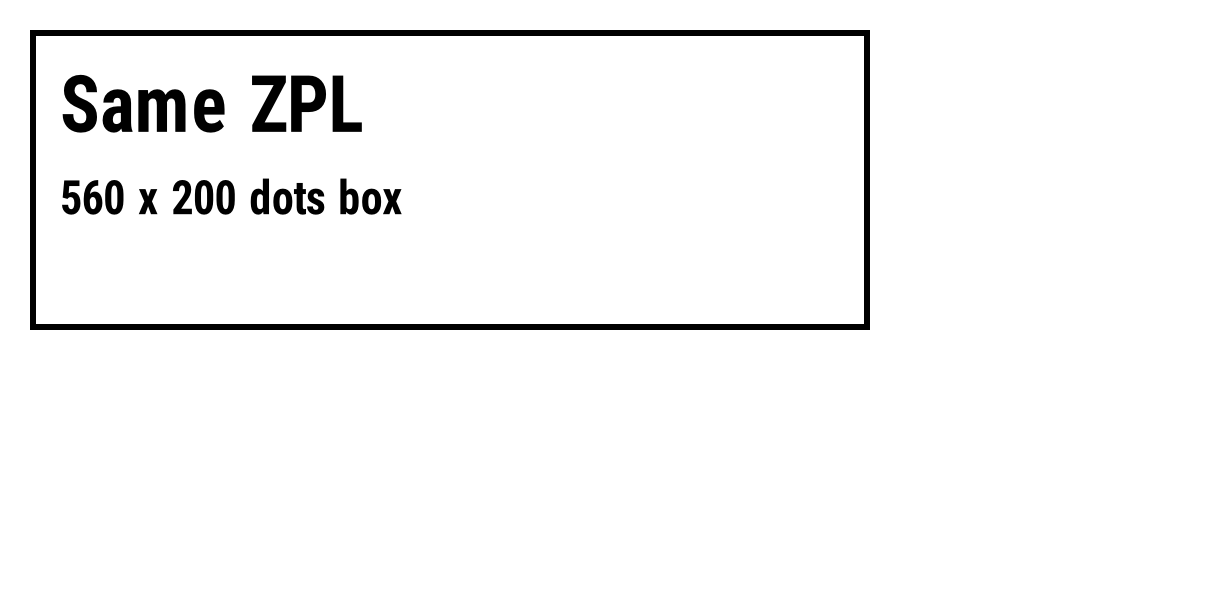
^XA
^MUD,200,300
^FO20,20^GB560,200,4^FS
^FO40,50^A0N,50,50^FDSame ZPL^FS
^FO40,120^A0N,30,30^FD560 x 200 dots box^FS
^XZ
It's the quickest fix for a carrier label written for 203 dpi. Check barcodes after scaling: bar widths are whole dots, and the printer has to round them.
Fix 2: rewrite the coordinates
For a label you maintain, generate it for the target density: multiply every position, size and font height by 12 / 8 = 1.5 for 203 → 300 dpi, and set ^PW and ^LL from the table above. Or work in millimetres: with ^MUM every following coordinate is in millimetres and the label keeps its physical size on any density.
Which density should I choose?
- 203 dpi is the default for shipping labels: carriers generate ZPL for it, and their barcodes are sized for it.
- 300 dpi pays off for small labels, small text (under about 6 pt) and dense 2D codes, such as jewellery tags or electronic component labels.
- 600 dpi is for very small labels and fine print; its printheads cost more and wear faster.
To find your printer's density, print a configuration label (usually by holding the feed button) and look for the resolution, or read it in the printer's web page. Then preview with the same density in the viewer.
Fragen
Why does my ZPL print smaller on a 300 dpi printer?
ZPL measures in dots and a 300 dpi dot is smaller: the same 560 dots are 70 mm at 203 dpi and 46.7 mm at 300 dpi. Scale with ^MUD,200,300 or rewrite the coordinates.
Is 12 dpmm exactly 300 dpi?
No. 12 dots per millimetre are 304.8 dots per inch; 8 dpmm are 203.2.
How many dots is a 4 × 6 in label at 203 dpi?
812 × 1219 dots, rounding down: 4 × 203.2 = 812.8 and 6 × 203.2 = 1219.2, so ^PW812 and ^LL1219.