Product label template in ZPL
A retail product label in ZPL carries the product name, a SKU, a price and a retail barcode — UPC-A (^BU) in North America or EAN-13 (^BE) elsewhere. Copy the 4 × 2 in template below, change the text and the barcode digits, and render it.
Atualizado 2026-11-01 · Renders made with the OpenZPL engine
Abrir no visualizadorWhat goes on a product label
- The retail barcode: UPC-A (
^BU, 12 digits) in North America, EAN-13 (^BE, 13 digits) in Europe and most of the world. The printer adds the check digit. - Name, variant and net quantity, a SKU for your own system, and a price.
- Size: shelf and product labels are often 4 × 2 in or smaller. Keep the barcode at
^BY3so it scans at the till; see barcodes in ZPL.
4 × 2 in product template
Name, SKU, price and a UPC-A barcode, laid out for 812 × 406 dots:
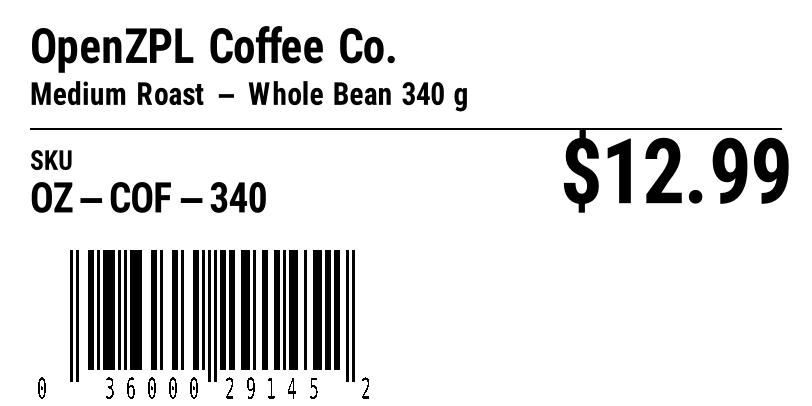
^XA
^CI28
^PW812
^LL406
^FO30,28^A0N,46,46^FDOpenZPL Coffee Co.^FS
^FO30,82^A0N,30,30^FDMedium Roast - Whole Bean 340 g^FS
^FO30,128^GB752,2,2^FS
^FO30,150^A0N,26,26^FDSKU^FS
^FO30,182^A0N,40,40^FDOZ-COF-340^FS
^FO560,138^A0N,86,86^FD$12.99^FS
^BY3,2,120
^FO70,250^BUN,120,Y,N,Y^FD03600029145^FS
^XZ
For a European product use EAN-13 instead: ^FO30,250^BEN,120,Y,N^FD5901234123457^FS. See EAN-13 and UPC-A for the digits each one takes.
Render it from your code
curl https://api.openzpl.com/v1/printers/8dpmm/labels/4x2/0/ \
  --data-binary @label.zpl > label.png
Every template on this page renders through the same API. Send the ZPL as the request body and get a PNG or PDF back; see the API docs and ZPL to PDF.
Perguntas
Which barcode does a retail product label use?
UPC-A for North America (^BU, 12 digits) and EAN-13 for the rest of the world (^BE, 13 digits). Both are scanned at the point of sale; the printer computes the final check digit.
How small can a product barcode be?
Keep a UPC-A or EAN-13 near its nominal size: a module width of ^BY3 or more at 203 dpi, with a clear quiet zone on each side. Too narrow and the till scanner misreads it.