Jewelry label template in ZPL
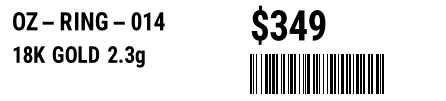
A jewelry label in ZPL is tiny — a SKU, the metal and weight, a price and a small Code 128 barcode on a label about 2.2 × 0.5 in. Copy the template below and change the fields.
Actualizado 2026-11-01 · Renderizados hechos con el motor de OpenZPL
Abrir en el visorWhat goes on a jewelry tag
- A SKU to identify the piece, and the metal and weight (18K gold, 2.3 g).
- A price, the largest element so it reads at a glance.
- A small Code 128 barcode (
^BC) of the SKU — with no human-readable line, to save space. - Size: a barbell / rat-tail jewelry tag is small, about 2.2 × 0.5 in; only one end may be visible once it is looped through the piece.
2.2 × 0.5 in jewelry template
SKU, metal and weight, price and a small Code 128 barcode, laid out for 446 × 101 dots:
^XA
^CI28
^PW446
^LL101
^FO12,12^A0N,24,24^FDOZ-RING-014^FS
^FO12,46^A0N,22,22^FD18K GOLD 2.3g^FS
^FO250,10^A0N,40,40^FD$349^FS
^BY1,2,40
^FO250,54^BCN,40,N,N,N^FDOZRING014^FS
^XZ
At this size the barcode uses ^BY1 (the narrowest module) and N for no interpretation line. Keep the SKU short, and test the scan on paper before a run — tiny barcodes are the first to fail.
Rendéralo desde su código
curl https://api.openzpl.com/v1/printers/8dpmm/labels/2.2x0.5/0/ \
  --data-binary @label.zpl > label.png
Every template on this page renders through the same API. Send the ZPL as the request body and get a PNG or PDF back; see the API docs and ZPL to PDF.
Preguntas
What barcode fits a tiny jewelry tag?
Code 128 (^BC) with a narrow module (^BY1) and no interpretation line, or a small Data Matrix (^BX) when the tag is square. Keep the data short so the bars stay wide enough to scan.
How small can the label be?
Jewelry tags are often 2.2 × 0.5 in or smaller, with only one printable end visible. Test the barcode at your printer's density; 300 dpi draws small bars more cleanly than 203 dpi.