Address label template in ZPL
An address label in ZPL is a small return-address block and a larger recipient block, with no barcode. Copy the 4 × 2 in template below, change the two addresses, and render it to a PNG or PDF.
Uppdaterad 2026-11-01 · Renders made with the OpenZPL engine
Öppna i visarenWhat goes on an address label
- A return address in small text at the top, your own.
- The recipient in larger text and lower, so the mail carrier reads it first.
- No barcode on a plain mailing label — add one only if your post service gives you a routing code.
- Size: 4 × 2 in suits most mailing labels; drop to 2 × 1 in for a small return-address sheet.
4 × 2 in address template
A return-address block, a divider and a large recipient block, laid out for 812 × 406 dots:
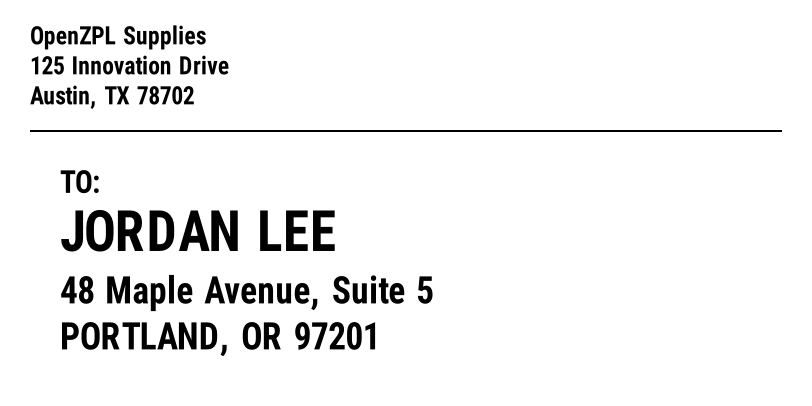
^XA
^CI28
^PW812
^LL406
^FO30,26^A0N,24,24^FDOpenZPL Supplies^FS
^FO30,56^A0N,24,24^FD125 Innovation Drive^FS
^FO30,86^A0N,24,24^FDAustin, TX 78702^FS
^FO30,130^GB752,2,2^FS
^FO60,170^A0N,30,30^FDTO:^FS
^FO60,210^A0N,54,54^FDJORDAN LEE^FS
^FO60,276^A0N,36,36^FD48 Maple Avenue, Suite 5^FS
^FO60,322^A0N,36,36^FDPORTLAND, OR 97201^FS
^XZ
Use ^A0N,54,54 for the recipient name so it is the biggest thing on the label. For a window envelope, line the recipient block up with the window by moving its ^FO.
Render it from your code
curl https://api.openzpl.com/v1/printers/8dpmm/labels/4x2/0/ \
  --data-binary @label.zpl > label.png
Every template on this page renders through the same API. Send the ZPL as the request body and get a PNG or PDF back; see the API docs and ZPL to PDF.
Frågor
Do address labels need a barcode?
No. A plain mailing label is just text. Add a barcode only if your postal service issues a routing or tracking code for it, in which case Code 128 (^BC) is usual.
How do I center the recipient name?
Wrap the text in a field block with centered justification: ^FO0,210^FB812,1,0,C^A0N,54,54^FDJORDAN LEE^FS.