Convert ZPL to PDF in Python
To convert ZPL to PDF from Python, POST the ZPL to the OpenZPL render endpoint with Accept: application/pdf and save the response bytes. Set the label size and density in the URL and check the HTTP status before writing the file.
Atualizado 2026-10-20 · Renders made with the OpenZPL engine
Open in the viewerWhat you need
- Python 3.8 or later and the
requestspackage (pip install requests). A standard-library version is further down. - Your ZPL as text, from a file, a database or a carrier API.
- The label size in inches and your printer's density. Most desktop printers are 203 dpi, which is
8dpmm; see 203 vs 300 dpi.
The shortest version
Six lines are enough to test the endpoint. The PDF has one page per label in the ZPL.
import requests

zpl = open("label.zpl", encoding="utf-8").read()
res = requests.post("https://api.openzpl.com/v1/printers/8dpmm/labels/4x2/",
                    data=zpl.encode("utf-8"), headers={"Accept": "application/pdf"}, timeout=30)
res.raise_for_status()
open("label.pdf", "wb").write(res.content)
This is the label in that file, rendered by the same engine the API uses:
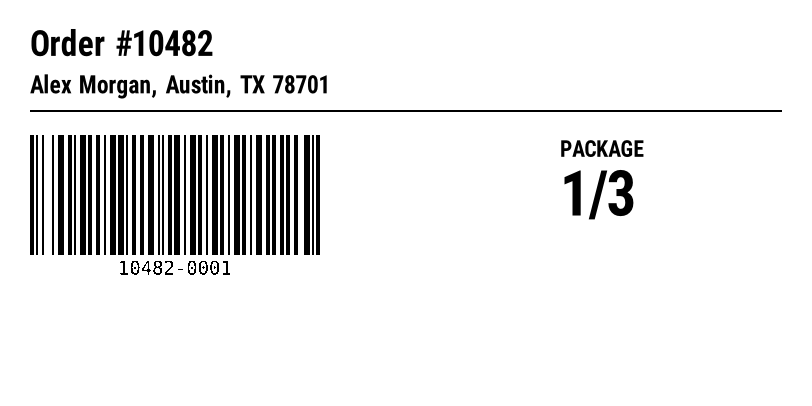
^XA
^CI28
^FO30,30^A0N,34,34^FDOrder #10482^FS
^FO30,75^A0N,24,24^FDAlex Morgan, Austin, TX 78701^FS
^FO30,110^GB752,2,2^FS
^BY2,3,120
^FO30,135^BCN,120,Y,N,N^FD10482-0001^FS
^FO560,140^A0N,22,22^FDPACKAGE^FS
^FO560,170^A0N,60,60^FD1/3^FS
^XZ
A function you can put in production
The short version has no retries and keeps the whole PDF in memory. This one sets a connect and a read timeout, waits as long as the API asks when it answers 429 or 503, streams the PDF to disk and returns how many labels it contains.
import time

import requests

API = "https://api.openzpl.com/v1/printers/{dpmm}dpmm/labels/{size}/"


def zpl_to_pdf(zpl, path, *, dpmm=8, size="4x6", api_key=None, retries=3):
    """Render every label in `zpl` into one PDF at `path`. Returns the label count."""
    headers = {"Accept": "application/pdf"}
    if api_key:
        headers["X-API-Key"] = api_key
    url = API.format(dpmm=dpmm, size=size)
    for attempt in range(retries + 1):
        res = requests.post(url, data=zpl.encode("utf-8"), headers=headers,
                            timeout=(5, 30), stream=True)
        if res.status_code in (429, 503) and attempt < retries:
            # The API says how long to wait; never retry faster than that.
            time.sleep(int(res.headers.get("Retry-After", "1")))
            continue
        if res.status_code != 200:
            raise RuntimeError(f"HTTP {res.status_code}: {res.text.strip()}")
        with open(path, "wb") as f:
            for chunk in res.iter_content(64 * 1024):
                f.write(chunk)
        return int(res.headers["X-Total-Count"])
    raise RuntimeError("still rate limited after retries")


if __name__ == "__main__":
    zpl = open("label.zpl", encoding="utf-8").read()
    count = zpl_to_pdf(zpl, "label.pdf")
    print(f"label.pdf: {count} label(s)")
Run against a file with four labels, it printed label.pdf: 4 label(s) and the PDF had four 4 × 6 in pages. X-Total-Count is the number of labels the ZPL produces, ^PQ copies included.
^CI28 at the top of the label when the data has accents or other non-ASCII characters. See accented characters.Without requests
If you can't add a dependency, urllib from the standard library does the same request. It raises HTTPError for any status other than 2xx; the error body is in e.read().
import urllib.request

zpl = b"^XA^FO50,50^A0N,50,50^FDHello from Python^FS^XZ"
req = urllib.request.Request(
    "https://api.openzpl.com/v1/printers/8dpmm/labels/4x6/",
    data=zpl, headers={"Accept": "application/pdf"}, method="POST")
with urllib.request.urlopen(req, timeout=30) as res, open("hello.pdf", "wb") as f:
    f.write(res.read())
Variants
- A PNG instead of a PDF: drop the
Acceptheader and add the label index to the URL (.../4x6/0/). The PNG is the first label, or the one at that index. - 1-bit output: send
X-Quality: Bitonalfor black and white without grey edges, as the printer prints it. The default isGrayscale. - Rotation:
X-Rotation: 90turns the output clockwise; the PDF page turns with it. - Your plan's limits: send your key in
X-API-Key. Without it the free limits apply per IP. - More than 50 labels: split the ZPL into requests of up to 50 labels, as shown in several labels in one PDF.
Errors and what to do
Errors come back as plain text starting with ERROR:, so res.text is a message you can log as it is. A 413 for too many labels reads ERROR: The ZPL produces 60 labels; the maximum per request is 50.
| Status | What it means | What to do |
|---|---|---|
400 | A parameter in the URL is wrong, or a barcode's data is invalid. | Read the text after ERROR: and fix the request. Don't retry it unchanged. |
404 | The ZPL has no label, or the label index is out of range. X-Total-Count says how many labels there are. | Check that the ZPL has complete ^XA … ^XZ blocks, or ask for an index below X-Total-Count. |
406 | The Accept header asks for a format the API doesn't produce. | Send image/png or application/pdf. |
413 | O corpo está acima de 1 MB, ou o ZPL produz mais de 50 etiquetas. | Split the job into several requests. |
429 | A limit of your plan was hit: requests per second, or labels per UTC day. | Wait the seconds in Retry-After, then retry. |
503 | The label took more than 10 seconds to render, or the service is at capacity. | Retry once after Retry-After; if it repeats, lower the density or split the label. |
A 429 names the limit it hit, for example ERROR: Rate limit: 3 requests per second on this plan; retry in 1 second. The daily limit sends a Retry-After of the seconds left until midnight UTC, so the function above would sleep for hours: in a worker, cap the wait and requeue the job instead.
Limits to keep in mind
- Endpoint:
POST https://api.openzpl.com/v1/printers/8dpmm/labels/4x6/with the ZPL as the request body. The density is6dpmm,8dpmm,12dpmmor24dpmm; the size is in inches, up to 15 per side. Accept: application/pdfwithout a label index returns every label, one per page. Add an index (.../4x6/0/) to get a single label.- Free plan: no key, 3 requests per second and 5,000 labels per day per IP address. Every label counts,
^PQcopies and PDF pages included. See pricing. - Per request: up to 50 labels and 1 MB of ZPL.
Perguntas
Is there a Python library for ZPL to PDF?
You don't need one: the API takes the ZPL as the request body and returns the PDF, so requests or urllib is enough. The function above is the whole client.
Can I get one PDF per label?
Yes. Request each label by index with Accept: application/pdf (.../4x6/0/, .../4x6/1/), or send each label in its own request.
Does the API keep my ZPL?
No. The label is rendered and returned; the ZPL isn't stored.