Convert ZPL to PDF in Node.js
To convert ZPL to PDF in Node.js, send the ZPL with fetch as the body of a POST to the OpenZPL render endpoint, with Accept: application/pdf, and stream the response to a file. Node 18 and later have fetch built in, so no package is needed.
Mis à jour le 2026-10-20 · Renders made with the OpenZPL engine
What you need
- Node.js 18 or later:
fetch,AbortSignal.timeoutand web streams are built in. The code below uses ES modules (.mjs). - The label size in inches and the printer density (
8dpmmfor 203 dpi).
The minimal request
import { writeFile } from "node:fs/promises";

const zpl = "^XA^FO50,50^A0N,50,50^FDHello from Node^FS^XZ";
const res = await fetch("https://api.openzpl.com/v1/printers/8dpmm/labels/4x6/", {
  method: "POST",
  headers: { Accept: "application/pdf" },
  body: zpl,
});
if (!res.ok) throw new Error(await res.text());
await writeFile("label.pdf", Buffer.from(await res.arrayBuffer()));
fetch doesn't throw on a 400 or a 429: check res.ok yourself, or you will write the error text into a file named .pdf.
A small module for production
Save this as label-api.mjs. It streams the PDF to disk instead of buffering it, aborts a request after 30 seconds, and on 429 or 503 waits the seconds the API puts in Retry-After before trying again.
import { createWriteStream } from "node:fs";
import { Readable } from "node:stream";
import { pipeline } from "node:stream/promises";
import { setTimeout as sleep } from "node:timers/promises";

const API = "https://api.openzpl.com/v1/printers";

export async function zplToPdf(zpl, path, { dpmm = 8, size = "4x6", apiKey, retries = 3 } = {}) {
  const headers = { Accept: "application/pdf" };
  if (apiKey) headers["X-API-Key"] = apiKey;
  for (let attempt = 0; ; attempt++) {
    const res = await fetch(`${API}/${dpmm}dpmm/labels/${size}/`, {
      method: "POST",
      headers,
      body: zpl,
      signal: AbortSignal.timeout(30_000),
    });
    if ((res.status === 429 || res.status === 503) && attempt < retries) {
      await res.body?.cancel();
      await sleep(Number(res.headers.get("Retry-After") ?? 1) * 1000);
      continue;
    }
    if (!res.ok) throw new Error(`HTTP ${res.status}: ${(await res.text()).trim()}`);
    // Stream the PDF to disk instead of buffering it in memory.
    await pipeline(Readable.fromWeb(res.body), createWriteStream(path));
    return Number(res.headers.get("X-Total-Count"));
  }
}
The label in this guide's example, as the engine renders it:
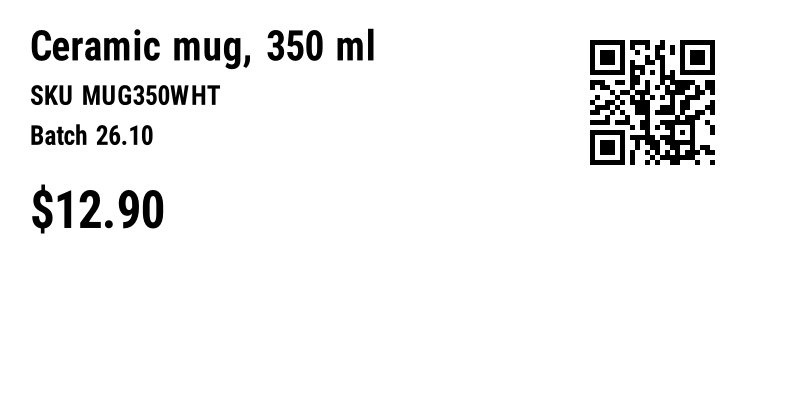
^XA
^CI28
^FO30,30^A0N,40,40^FDCeramic mug, 350 ml^FS
^FO30,85^A0N,26,26^FDSKU MUG350WHT^FS
^FO30,125^A0N,26,26^FDBatch 26.10^FS
^FO30,190^A0N,50,50^FD$12.90^FS
^FO590,30^BQN,2,5^FDLA,https://openzpl.com/p/MUG350^FS
^XZ
Batch: one PDF per order
Run requests one after another rather than all at once with Promise.all: the free plan allows 3 requests per second per IP, and a burst only buys you 429 responses. The module above already waits when told to.
import { zplToPdf } from "./label-api.mjs";

const orders = [
  { id: "10482", name: "Alex Morgan" },
  { id: "10483", name: "Sam Lee" },
  { id: "10484", name: "Rosa Diaz" },
];

// One request per order, one after another: the free plan allows
// 3 requests per second, and zplToPdf waits when the API says so.
for (const o of orders) {
  const zpl = `^XA^CI28^FO40,40^A0N,50,50^FD${o.name}^FS^FO40,110^A0N,30,30^FDOrder ${o.id}^FS^XZ`;
  await zplToPdf(zpl, `order-${o.id}.pdf`, { size: "4x2" });
}
Against a server limited to one request per second, the three orders took about two seconds: two of the requests got a 429 and were retried after one second, and all three PDFs were written.
^ and ~ from it before putting it in ^FD: either character starts a new command and cuts the field. See special characters in data.Variants
- In the browser: the same
fetchworks from a web page; the API sends CORS headers and exposesX-Total-CountandRetry-After. Turn the response into a link withURL.createObjectURL(await res.blob()). - PNG preview: omit
Acceptand add the label index (.../4x6/0/). - Your key: pass
{ apiKey: process.env.OPENZPL_KEY }; never ship a key in browser code.
Erreurs
| Statut | What it means | What to do |
|---|---|---|
400 | A parameter in the URL is wrong, or a barcode's data is invalid. | Read the text after ERROR: and fix the request. Don't retry it unchanged. |
404 | The ZPL has no label, or the label index is out of range. X-Total-Count says how many labels there are. | Check that the ZPL has complete ^XA … ^XZ blocks, or ask for an index below X-Total-Count. |
406 | The Accept header asks for a format the API doesn't produce. | Send image/png or application/pdf. |
413 | Le corps fait plus de 1 Mo, ou le ZPL produit plus de 50 étiquettes. | Split the job into several requests. |
429 | A limit of your plan was hit: requests per second, or labels per UTC day. | Wait the seconds in Retry-After, then retry. |
503 | The label took more than 10 seconds to render, or the service is at capacity. | Retry once after Retry-After; if it repeats, lower the density or split the label. |
Limites
- Endpoint:
POST https://api.openzpl.com/v1/printers/8dpmm/labels/4x6/with the ZPL as the request body. The density is6dpmm,8dpmm,12dpmmor24dpmm; the size is in inches, up to 15 per side. Accept: application/pdfwithout a label index returns every label, one per page. Add an index (.../4x6/0/) to get a single label.- Free plan: no key, 3 requests per second and 5,000 labels per day per IP address. Every label counts,
^PQcopies and PDF pages included. See pricing. - Per request: up to 50 labels and 1 MB of ZPL.
Questions
Do I need an npm package to convert ZPL in Node.js?
No. Node 18 and later have fetch built in, and the API does the rendering. The module above has no dependencies.
Why do I get a file that isn't a valid PDF?
The request failed and the error text was written to disk. Check res.ok before saving; the body of an error starts with ERROR:.
How do I send many labels quickly?
Put up to 50 labels in one request and get them back as one PDF, rather than sending one request per label.