Convert ZPL to PDF in Node.js
To convert ZPL to PDF in Node.js, send the ZPL with fetch as the body of a POST to the OpenZPL render endpoint, with Accept: application/pdf, and stream the response to a file. Node 18 and later have fetch built in, so no package is needed.
Actualizado 2026-10-20 · Renderizados hechos con el motor de OpenZPL
Abrir en el visorLo que necesita
- Node.js 18 or later:
fetch,AbortSignal.timeoutand web streams are built in. The code below uses ES modules (.mjs). - The label size in inches and the printer density (
8dpmmfor 203 dpi).
The minimal request
import { writeFile } from "node:fs/promises";

const zpl = "^XA^FO50,50^A0N,50,50^FDHello from Node^FS^XZ";
const res = await fetch("https://api.openzpl.com/v1/printers/8dpmm/labels/4x6/", {
  method: "POST",
  headers: { Accept: "application/pdf" },
  body: zpl,
});
if (!res.ok) throw new Error(await res.text());
await writeFile("label.pdf", Buffer.from(await res.arrayBuffer()));
fetch doesn't throw on a 400 or a 429: check res.ok yourself, or you will write the error text into a file named .pdf.
A small module for production
Save this as label-api.mjs. It streams the PDF to disk instead of buffering it, aborts a request after 30 seconds, and on 429 or 503 waits the seconds the API puts in Retry-After before trying again.
import { createWriteStream } from "node:fs";
import { Readable } from "node:stream";
import { pipeline } from "node:stream/promises";
import { setTimeout as sleep } from "node:timers/promises";

const API = "https://api.openzpl.com/v1/printers";

export async function zplToPdf(zpl, path, { dpmm = 8, size = "4x6", apiKey, retries = 3 } = {}) {
  const headers = { Accept: "application/pdf" };
  if (apiKey) headers["X-API-Key"] = apiKey;
  for (let attempt = 0; ; attempt++) {
    const res = await fetch(`${API}/${dpmm}dpmm/labels/${size}/`, {
      method: "POST",
      headers,
      body: zpl,
      signal: AbortSignal.timeout(30_000),
    });
    if ((res.status === 429 || res.status === 503) && attempt < retries) {
      await res.body?.cancel();
      await sleep(Number(res.headers.get("Retry-After") ?? 1) * 1000);
      continue;
    }
    if (!res.ok) throw new Error(`HTTP ${res.status}: ${(await res.text()).trim()}`);
    // Stream the PDF to disk instead of buffering it in memory.
    await pipeline(Readable.fromWeb(res.body), createWriteStream(path));
    return Number(res.headers.get("X-Total-Count"));
  }
}
The label in this guide's example, as the engine renders it:
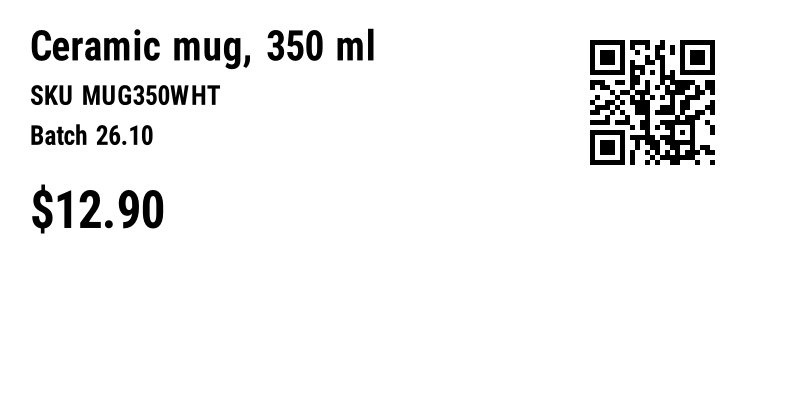
^XA
^CI28
^FO30,30^A0N,40,40^FDCeramic mug, 350 ml^FS
^FO30,85^A0N,26,26^FDSKU MUG350WHT^FS
^FO30,125^A0N,26,26^FDBatch 26.10^FS
^FO30,190^A0N,50,50^FD$12.90^FS
^FO590,30^BQN,2,5^FDLA,https://openzpl.com/p/MUG350^FS
^XZ
Batch: one PDF per order
Run requests one after another rather than all at once with Promise.all: the free plan allows 3 requests per second per IP, and a burst only buys you 429 responses. The module above already waits when told to.
import { zplToPdf } from "./label-api.mjs";

const orders = [
  { id: "10482", name: "Alex Morgan" },
  { id: "10483", name: "Sam Lee" },
  { id: "10484", name: "Rosa Diaz" },
];

// One request per order, one after another: the free plan allows
// 3 requests per second, and zplToPdf waits when the API says so.
for (const o of orders) {
  const zpl = `^XA^CI28^FO40,40^A0N,50,50^FD${o.name}^FS^FO40,110^A0N,30,30^FDOrder ${o.id}^FS^XZ`;
  await zplToPdf(zpl, `order-${o.id}.pdf`, { size: "4x2" });
}
Against a server limited to one request per second, the three orders took about two seconds: two of the requests got a 429 and were retried after one second, and all three PDFs were written.
^ and ~ from it before putting it in ^FD: either character starts a new command and cuts the field. See special characters in data.Variantes
- In the browser: the same
fetchworks from a web page; the API sends CORS headers and exposesX-Total-CountandRetry-After. Turn the response into a link withURL.createObjectURL(await res.blob()). - PNG preview: omit
Acceptand add the label index (.../4x6/0/). - Your key: pass
{ apiKey: process.env.OPENZPL_KEY }; never ship a key in browser code.
Errores
| Estado | Lo que significa | Qué hacer |
|---|---|---|
400 | Un parámetro en la URL es incorrecto, o los datos de un código de barras son inválidos. | Lea el texto después de ERROR: y corrija la solicitud. No la reintente sin cambios. |
404 | El ZPL no tiene etiqueta, o el índice de la etiqueta está fuera de rango. X-Total-Count indica cuántas etiquetas hay. | Verifique que el ZPL tenga bloques completos de ^XA … ^XZ, o pida un índice por debajo de X-Total-Count. |
406 | El encabezado Accept solicita un formato que la API no produce. | Enviar image/png o application/pdf. |
413 | El cuerpo supera 1 MB, o el ZPL produce más de 50 etiquetas. | Divide el trabajo en varias solicitudes. |
429 | Se alcanzó un límite de su plan: solicitudes por segundo o etiquetas por día UTC. | Espere los segundos en Retry-After, luego reintente. |
503 | La etiqueta tardó más de 10 segundos en renderizar, o el servicio está a capacidad. | Intente de nuevo una vez después de Retry-After; si se repite, baje la densidad o divida la etiqueta. |
Límites
- Punto final:
POST https://api.openzpl.com/v1/printers/8dpmm/labels/4x6/con el ZPL como cuerpo de la solicitud. La densidad es6dpmm,8dpmm,12dpmmo24dpmm; el tamaño está en pulgadas, hasta 15 por lado. Accept: application/pdfsin un índice de etiqueta devuelve cada etiqueta, una por página. Agregue un índice (.../4x6/0/) para obtener una sola etiqueta.- Plan gratuito: sin clave, 3 solicitudes por segundo y 5,000 etiquetas por día por dirección IP. Cada etiqueta cuenta, se incluyen copias
^PQy páginas PDF. Consulte precios. - Por solicitud: hasta 50 etiquetas y 1 MB de ZPL.
Preguntas
Do I need an npm package to convert ZPL in Node.js?
No. Node 18 and later have fetch built in, and the API does the rendering. The module above has no dependencies.
Why do I get a file that isn't a valid PDF?
The request failed and the error text was written to disk. Check res.ok before saving; the body of an error starts with ERROR:.
How do I send many labels quickly?
Put up to 50 labels in one request and get them back as one PDF, rather than sending one request per label.