Convert ZPL to PDF in C#
To convert ZPL to PDF in C#, post the ZPL as StringContent with HttpClient to the OpenZPL render endpoint, ask for application/pdf, and copy the response stream to a file. Reuse one HttpClient for the whole application and check the status code before saving.
Mis à jour le 2026-10-20 · Renders made with the OpenZPL engine
What you need
- Any supported .NET (6 or later).
HttpClientis part of the base library; no NuGet package is needed. - The ZPL as a string, the label size in inches and the printer density (
8dpmm= 203 dpi).
The code
HttpClient is meant to be created once and reused: a new client per label exhausts sockets under load. Ask for the headers first (ResponseHeadersRead) so the PDF is copied to the file as it arrives instead of being buffered.
using System.Net;
using System.Net.Http.Headers;
using System.Text;

public static class LabelApi
{
    static readonly HttpClient Http = new()
    {
        BaseAddress = new Uri("https://api.openzpl.com/"),
        Timeout = TimeSpan.FromSeconds(30),
    };

    public static async Task<int> ZplToPdfAsync(string zpl, string path,
        int dpmm = 8, string size = "4x6", string? apiKey = null, int retries = 3)
    {
        for (var attempt = 0; ; attempt++)
        {
            using var req = new HttpRequestMessage(HttpMethod.Post, $"v1/printers/{dpmm}dpmm/labels/{size}/")
            {
                Content = new StringContent(zpl, Encoding.UTF8, "text/plain"),
            };
            req.Headers.Accept.Add(new MediaTypeWithQualityHeaderValue("application/pdf"));
            if (apiKey is not null) req.Headers.Add("X-API-Key", apiKey);

            using var res = await Http.SendAsync(req, HttpCompletionOption.ResponseHeadersRead);
            if ((res.StatusCode == HttpStatusCode.TooManyRequests ||
                 res.StatusCode == HttpStatusCode.ServiceUnavailable) && attempt < retries)
            {
                var wait = res.Headers.RetryAfter?.Delta ?? TimeSpan.FromSeconds(1);
                await Task.Delay(wait);
                continue;
            }
            if (!res.IsSuccessStatusCode)
                throw new HttpRequestException($"HTTP {(int)res.StatusCode}: {await res.Content.ReadAsStringAsync()}");

            await using (var file = File.Create(path))
                await res.Content.CopyToAsync(file);
            return int.Parse(res.Headers.GetValues("X-Total-Count").First());
        }
    }
}

// var count = await LabelApi.ZplToPdfAsync(File.ReadAllText("label.zpl"), "label.pdf");
The label in this example:
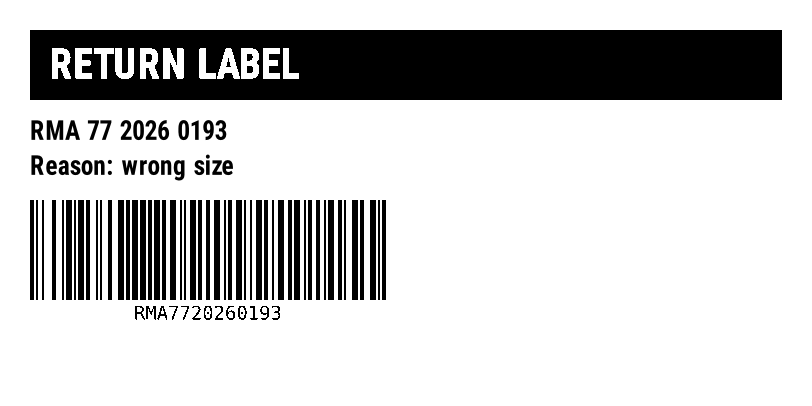
^XA
^FO30,30^GB752,70,70^FS
^FO50,48^A0N,40,40^FR^FDRETURN LABEL^FS
^FO30,120^A0N,26,26^FDRMA 77 2026 0193^FS
^FO30,155^A0N,26,26^FDReason: wrong size^FS
^BY2,3,100
^FO30,200^BCN,100,Y,N,N^FDRMA7720260193^FS
^XZ
Notes for .NET
- In ASP.NET Core, register the client with
IHttpClientFactory(services.AddHttpClient) instead of a static field; the request code stays the same. Retry-Afterarrives as a number of seconds, which .NET exposes asRetryAfter.Delta. The daily limit sets it to the seconds left until midnight UTC: cap the delay in a background job.- The API reads the body as text.
StringContentwith UTF-8 keeps accents intact if the label starts with^CI28. - To return the PDF from a controller, stream it with
File(stream, "application/pdf")rather than loading it into a byte array.
Erreurs
| Statut | What it means | What to do |
|---|---|---|
400 | A parameter in the URL is wrong, or a barcode's data is invalid. | Read the text after ERROR: and fix the request. Don't retry it unchanged. |
404 | The ZPL has no label, or the label index is out of range. X-Total-Count says how many labels there are. | Check that the ZPL has complete ^XA … ^XZ blocks, or ask for an index below X-Total-Count. |
406 | The Accept header asks for a format the API doesn't produce. | Send image/png or application/pdf. |
413 | Le corps fait plus de 1 Mo, ou le ZPL produit plus de 50 étiquettes. | Split the job into several requests. |
429 | A limit of your plan was hit: requests per second, or labels per UTC day. | Wait the seconds in Retry-After, then retry. |
503 | The label took more than 10 seconds to render, or the service is at capacity. | Retry once after Retry-After; if it repeats, lower the density or split the label. |
Limites
- Endpoint:
POST https://api.openzpl.com/v1/printers/8dpmm/labels/4x6/with the ZPL as the request body. The density is6dpmm,8dpmm,12dpmmor24dpmm; the size is in inches, up to 15 per side. Accept: application/pdfwithout a label index returns every label, one per page. Add an index (.../4x6/0/) to get a single label.- Free plan: no key, 3 requests per second and 5,000 labels per day per IP address. Every label counts,
^PQcopies and PDF pages included. See pricing. - Per request: up to 50 labels and 1 MB of ZPL.
Questions
Is there a .NET library to convert ZPL to PDF?
You can use one, but the API needs nothing beyond HttpClient: it returns the finished PDF. There is no native renderer to install or license.
Can I print the PDF from C# afterwards?
Yes, with any PDF printing component, on any printer. To print ZPL on a Zebra printer you would send the ZPL itself, not the PDF.