Convert ZPL to PDF in C#
To convert ZPL to PDF in C#, post the ZPL as StringContent with HttpClient to the OpenZPL render endpoint, ask for application/pdf, and copy the response stream to a file. Reuse one HttpClient for the whole application and check the status code before saving.
Actualizado 2026-10-20 · Renderizados hechos con el motor de OpenZPL
Abrir en el visorLo que necesita
- Any supported .NET (6 or later).
HttpClientis part of the base library; no NuGet package is needed. - The ZPL as a string, the label size in inches and the printer density (
8dpmm= 203 dpi).
The code
HttpClient is meant to be created once and reused: a new client per label exhausts sockets under load. Ask for the headers first (ResponseHeadersRead) so the PDF is copied to the file as it arrives instead of being buffered.
using System.Net;
using System.Net.Http.Headers;
using System.Text;

public static class LabelApi
{
    static readonly HttpClient Http = new()
    {
        BaseAddress = new Uri("https://api.openzpl.com/"),
        Timeout = TimeSpan.FromSeconds(30),
    };

    public static async Task<int> ZplToPdfAsync(string zpl, string path,
        int dpmm = 8, string size = "4x6", string? apiKey = null, int retries = 3)
    {
        for (var attempt = 0; ; attempt++)
        {
            using var req = new HttpRequestMessage(HttpMethod.Post, $"v1/printers/{dpmm}dpmm/labels/{size}/")
            {
                Content = new StringContent(zpl, Encoding.UTF8, "text/plain"),
            };
            req.Headers.Accept.Add(new MediaTypeWithQualityHeaderValue("application/pdf"));
            if (apiKey is not null) req.Headers.Add("X-API-Key", apiKey);

            using var res = await Http.SendAsync(req, HttpCompletionOption.ResponseHeadersRead);
            if ((res.StatusCode == HttpStatusCode.TooManyRequests ||
                 res.StatusCode == HttpStatusCode.ServiceUnavailable) && attempt < retries)
            {
                var wait = res.Headers.RetryAfter?.Delta ?? TimeSpan.FromSeconds(1);
                await Task.Delay(wait);
                continue;
            }
            if (!res.IsSuccessStatusCode)
                throw new HttpRequestException($"HTTP {(int)res.StatusCode}: {await res.Content.ReadAsStringAsync()}");

            await using (var file = File.Create(path))
                await res.Content.CopyToAsync(file);
            return int.Parse(res.Headers.GetValues("X-Total-Count").First());
        }
    }
}

// var count = await LabelApi.ZplToPdfAsync(File.ReadAllText("label.zpl"), "label.pdf");
The label in this example:
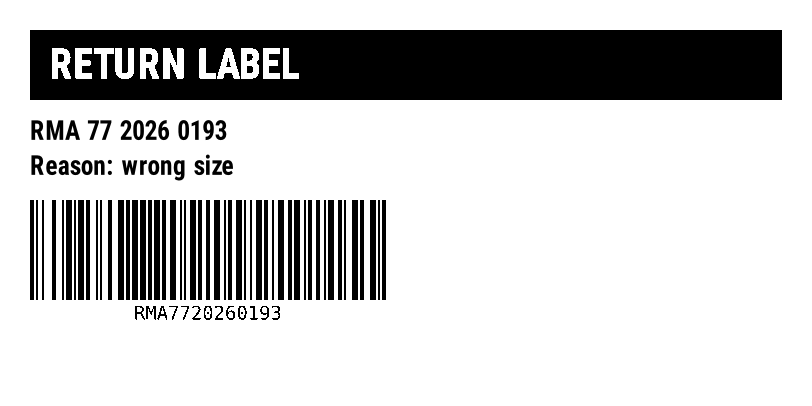
^XA
^FO30,30^GB752,70,70^FS
^FO50,48^A0N,40,40^FR^FDRETURN LABEL^FS
^FO30,120^A0N,26,26^FDRMA 77 2026 0193^FS
^FO30,155^A0N,26,26^FDReason: wrong size^FS
^BY2,3,100
^FO30,200^BCN,100,Y,N,N^FDRMA7720260193^FS
^XZ
Notes for .NET
- In ASP.NET Core, register the client with
IHttpClientFactory(services.AddHttpClient) instead of a static field; the request code stays the same. Retry-Afterarrives as a number of seconds, which .NET exposes asRetryAfter.Delta. The daily limit sets it to the seconds left until midnight UTC: cap the delay in a background job.- The API reads the body as text.
StringContentwith UTF-8 keeps accents intact if the label starts with^CI28. - To return the PDF from a controller, stream it with
File(stream, "application/pdf")rather than loading it into a byte array.
Errores
| Estado | Lo que significa | Qué hacer |
|---|---|---|
400 | Un parámetro en la URL es incorrecto, o los datos de un código de barras son inválidos. | Lea el texto después de ERROR: y corrija la solicitud. No la reintente sin cambios. |
404 | El ZPL no tiene etiqueta, o el índice de la etiqueta está fuera de rango. X-Total-Count indica cuántas etiquetas hay. | Verifique que el ZPL tenga bloques completos de ^XA … ^XZ, o pida un índice por debajo de X-Total-Count. |
406 | El encabezado Accept solicita un formato que la API no produce. | Enviar image/png o application/pdf. |
413 | El cuerpo supera 1 MB, o el ZPL produce más de 50 etiquetas. | Divide el trabajo en varias solicitudes. |
429 | Se alcanzó un límite de su plan: solicitudes por segundo o etiquetas por día UTC. | Espere los segundos en Retry-After, luego reintente. |
503 | La etiqueta tardó más de 10 segundos en renderizar, o el servicio está a capacidad. | Intente de nuevo una vez después de Retry-After; si se repite, baje la densidad o divida la etiqueta. |
Límites
- Punto final:
POST https://api.openzpl.com/v1/printers/8dpmm/labels/4x6/con el ZPL como cuerpo de la solicitud. La densidad es6dpmm,8dpmm,12dpmmo24dpmm; el tamaño está en pulgadas, hasta 15 por lado. Accept: application/pdfsin un índice de etiqueta devuelve cada etiqueta, una por página. Agregue un índice (.../4x6/0/) para obtener una sola etiqueta.- Plan gratuito: sin clave, 3 solicitudes por segundo y 5,000 etiquetas por día por dirección IP. Cada etiqueta cuenta, se incluyen copias
^PQy páginas PDF. Consulte precios. - Por solicitud: hasta 50 etiquetas y 1 MB de ZPL.
Preguntas
Is there a .NET library to convert ZPL to PDF?
You can use one, but the API needs nothing beyond HttpClient: it returns the finished PDF. There is no native renderer to install or license.
Can I print the PDF from C# afterwards?
Yes, with any PDF printing component, on any printer. To print ZPL on a Zebra printer you would send the ZPL itself, not the PDF.