What is ZPL?
ZPL (Zebra Programming Language) is the text command language that Zebra and compatible thermal printers use to draw labels. A ZPL label is plain text: commands that start with ^ or ~ place text, barcodes, lines and images at positions measured in printer dots.
تم التحديث في 2026-10-20 · Renders made with the OpenZPL engine
Open in the viewerA complete label in eight lines
This is a whole label, with the picture the printer would print:
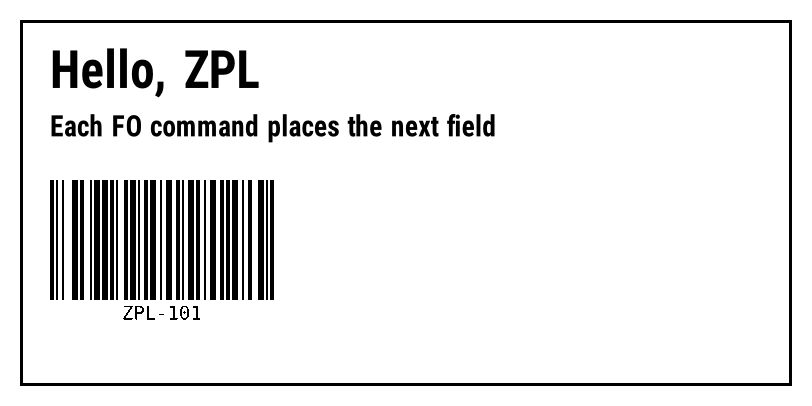
^XA
^FX A comment: a box, two lines of text and a barcode
^FO20,20^GB772,366,3^FS
^FO50,50^A0N,50,50^FDHello, ZPL^FS
^FO50,115^A0N,28,28^FDEach FO command places the next field^FS
^BY2,3,120
^FO50,180^BCN,120,Y,N,N^FDZPL-101^FS
^XZ
^XAopens the label and^XZcloses it. Everything in between is one label.^FXis a comment; the printer skips it.^FOx,ysets where the next field starts, in dots from the top-left corner (the field origin).^GBdraws a box,^A0picks the font and its size,^BCa Code 128 barcode and^BYthe bar width.^FDholds the data and^FSends the field.
Dots, not millimetres
Positions and sizes are in printer dots. How big a dot is depends on the printer: 8 dots per millimetre on a 203 dpi printer, 12 on a 300 dpi one. The same ZPL therefore prints smaller on a 300 dpi printer, which is the most common surprise when a label moves between printers; see 203 vs 300 dpi and dpmm.
Where ZPL comes from and who uses it
ZPL was created by Zebra Technologies; the current version is ZPL II, documented in the Zebra ZPL II Programming Guide. Many other thermal printer makers accept it too, which is why shipping carriers, marketplaces and warehouse systems hand out labels as ZPL: the same text prints on most label printers in a warehouse.
A ZPL file usually has the extension .zpl, .txt or .prn. It is sent to the printer as is, over USB, the network (often TCP port 9100) or a print queue; the printer interprets it, so the computer needs no driver to lay out the label.
ZPL and EPL
EPL is an older, simpler Zebra language with commands like A and B at the start of a line instead of ^ prefixes. Most current Zebra printers read both. If a file starts with ^XA, it's ZPL.
How to see a ZPL label without a printer
Paste the ZPL in the ZPL viewer: it draws the label as you type and exports it to PDF or PNG. From code, the OpenZPL API does the same over HTTP. Both run the same engine, which emulates a printer: check what it supports and confirm critical labels on the printer itself.
The commands you'll meet first
| Command | ماذا يفعل |
|---|---|
^XA / ^XZ | Start and end a label |
^FO | Position of the next field |
^A0 | Scalable font and its height and width in dots |
^FD / ^FS | Field data and end of field |
^GB | Box or line |
^BC, ^BQ | Code 128 barcode, QR code |
^CI28 | Read the data as UTF-8 |
^PW / ^LL | Label width and length in dots |
The ZPL command reference has every command with its parameters and a live example.
أسئلة
What does ZPL stand for?
Zebra Programming Language. The current version is called ZPL II.
Is ZPL only for Zebra printers?
No. Many thermal printers from other makers accept ZPL, though support for less common commands varies.
Can I open a ZPL file without a printer?
Yes. Paste it in the ZPL viewer or convert it to PDF.