Put several ZPL labels in one PDF
Send all the labels in one request, as consecutive ^XA … ^XZ blocks, with Accept: application/pdf and no label index in the URL: the API returns one PDF with one page per label. A request takes up to 50 labels, ^PQ copies included; split larger jobs.
Päivitetty 2026-10-20 · Renders made with the OpenZPL engine
Avaa katselijassaOne file, one page per label
Each ^XA … ^XZ block is one label. This file has three:
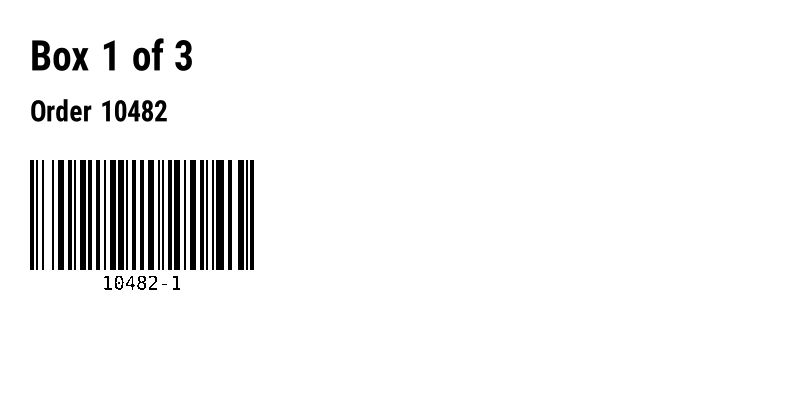
^XA
^FO30,40^A0N,40,40^FDBox 1 of 3^FS
^FO30,100^A0N,28,28^FDOrder 10482^FS
^BY2,3,110
^FO30,160^BCN,110,Y,N,N^FD10482-1^FS
^XZ
^XA
^FO30,40^A0N,40,40^FDBox 2 of 3^FS
^FO30,100^A0N,28,28^FDOrder 10482^FS
^BY2,3,110
^FO30,160^BCN,110,Y,N,N^FD10482-2^FS
^XZ
^XA
^FO30,40^A0N,40,40^FDBox 3 of 3^FS
^FO30,100^A0N,28,28^FDOrder 10482^FS
^BY2,3,110
^FO30,160^BCN,110,Y,N,N^FD10482-3^FS
^XZ
The render above is the first label. Send the whole file without an index and you get a three-page PDF:
curl https://api.openzpl.com/v1/printers/8dpmm/labels/4x2/ \
  -H "Accept: application/pdf" --data-binary @labels.zpl -o labels.pdf
The response carries X-Total-Count: 3. Every page has the size in the URL, here 4 × 2 in. Use --data-binary, not -d: -d strips the line breaks.
One label out of many
Add the index, starting at 0, to get one label. With a PNG you always get one label; with a PDF and an index you get a one-page PDF.
# The second label as PNG
curl https://api.openzpl.com/v1/printers/8dpmm/labels/4x2/1/ --data-binary @labels.zpl -o box2.png

# The third label as a one-page PDF
curl https://api.openzpl.com/v1/printers/8dpmm/labels/4x2/2/ \
  -H "Accept: application/pdf" --data-binary @labels.zpl -o box3.pdf
An index past the end returns 404 with ERROR: Label index 3 is out of range; the ZPL produces 3 label(s). Read X-Total-Count from a first response to know how many there are.
Copies with ^PQ
^PQ prints a label several times. Each copy is a page and counts as a label: ^PQ3 on a single label returns a three-page PDF and X-Total-Count: 3, and uses 3 of your daily labels.
^XA
^FO30,40^A0N,40,40^FDCopy^FS
^PQ3
^XZ
More than 50 labels
A request may produce up to 50 labels; more returns 413. Split the file between labels, never inside one, and count ^PQ copies when you group them. This Python script turned a 120-label file into three PDFs of 50, 50 and 20 pages:
import re

import requests

URL = "https://api.openzpl.com/v1/printers/8dpmm/labels/4x6/"
MAX_LABELS = 50  # per request


def labels_in(block: str) -> int:
    """A ^XA...^XZ block prints once, or ^PQ times."""
    m = re.search(r"\^PQ(\d+)", block)
    return int(m.group(1)) if m else 1


def chunks(zpl: str):
    """Group whole labels into requests of at most 50 labels each."""
    blocks = re.findall(r"\^XA.*?\^XZ", zpl, flags=re.S | re.I)
    batch, count = [], 0
    for b in blocks:
        n = labels_in(b)
        if batch and count + n > MAX_LABELS:
            yield "\n".join(batch)
            batch, count = [], 0
        batch.append(b)
        count += n
    if batch:
        yield "\n".join(batch)


zpl = open("orders.zpl", encoding="utf-8").read()
with requests.Session() as http:
    for i, part in enumerate(chunks(zpl), start=1):
        res = http.post(URL, data=part.encode("utf-8"),
                        headers={"Accept": "application/pdf"}, timeout=(5, 60))
        res.raise_for_status()
        with open(f"orders-{i:03}.pdf", "wb") as f:
            f.write(res.content)
        print(f"orders-{i:03}.pdf: {res.headers['X-Total-Count']} labels")
To end up with a single file, merge the parts with a PDF library such as pypdf. A single label with ^PQ above 50 can't be split this way: lower the copy count and repeat the request.
^DF) and the labels that recall it (^XF) must go in the same request: the API keeps nothing between requests.Rajat
- Endpoint:
POST https://api.openzpl.com/v1/printers/8dpmm/labels/4x6/with the ZPL as the request body. The density is6dpmm,8dpmm,12dpmmor24dpmm; the size is in inches, up to 15 per side. Accept: application/pdfwithout a label index returns every label, one per page. Add an index (.../4x6/0/) to get a single label.- Without a key: 3 requests per second and 3 labels per day per IP address, enough to try the API; a free key allows 20 labels a day. Every label counts,
^PQcopies and PDF pages included. See pricing. - Per request: up to 50 labels and 1 MB of ZPL.
Kysymykset
Does a 10-label PDF count as one request or ten?
Both, for different limits: it is one request against the per-second limit and ten labels against the daily allowance.
Can each page have a different size?
No. The size in the URL applies to every page. Send labels of different sizes in separate requests.
Why does my PDF have fewer pages than labels in the file?
Something between labels isn't a complete ^XA … ^XZ block, or a ^XA has no ^XZ. Check X-Total-Count against what you expect and open the file in the viewer.