EAN-13 barcodes in ZPL with ^BE
To print an EAN-13 barcode in ZPL, send the first 12 digits to ^BE and let the printer add the check digit: ^BY3,2,140^FO80,60^BEN,140,Y,N^FD590123412345^FS prints 5901234123457. If you send 13 digits, the 13th is replaced by the correct check digit.
Mis à jour le 2026-10-20 · Renders made with the OpenZPL engine
Open in the viewerGenerator
4 × 2 in label at 203 dpi. A preview shows how the printer draws the code; confirm with a scanner before printing a run.
The ^BE command
| Paramètre | Ce que cela fait | Valeurs |
|---|---|---|
^BY w | Module width, in dots | 2 to 4 is usual at 203 dpi |
^BE o | Orientation | N, R, I, B |
^BE h | Bar height, in dots | for example 100 to 150 |
^BE f | Print the digits under the bars | Y or N |
^BE g | Print the digits above the bars | Y or N |
An EAN-13 symbol is 95 modules wide, plus the quiet zones. At 203 dpi a dot is 0.125 mm, so ^BY3 gives 0.375 mm modules and bars 285 dots (35.6 mm) wide, about 114% of the 0.33 mm nominal module. ^BY2 gives 0.25 mm modules, about 76%, below the 80% that GS1 allows for retail point of sale.
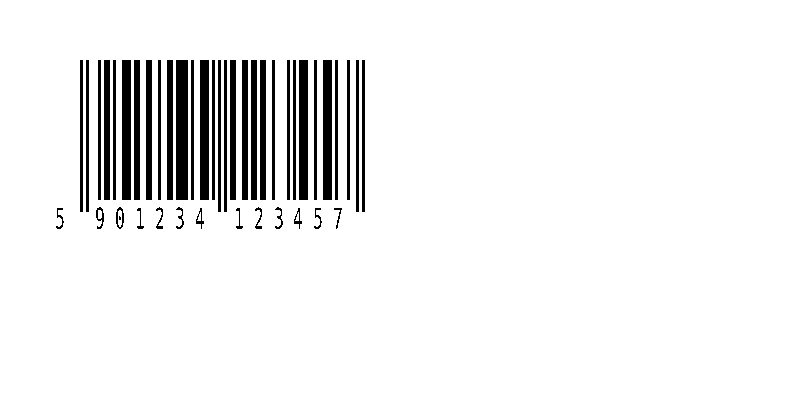
^XA
^BY3,2,140
^FO80,60^BEN,140,Y,N
^FD590123412345^FS
^XZ
The check digit
The 13th digit is computed from the first 12: add the digits in odd positions, add three times the digits in even positions, and take the amount needed to reach the next multiple of 10. For 590123412345 the weighted sum is 83, so the check digit is 7. See the check digit entry for the step-by-step calculation.
In our test the OpenZPL engine ignores a 13th digit and prints the correct one. Below, the data ends in 0, but the printed and scanned code is 5901234123457. Your database still has the wrong number, so fix it at the source:
^FD5901234123450 (wrong 13th digit)
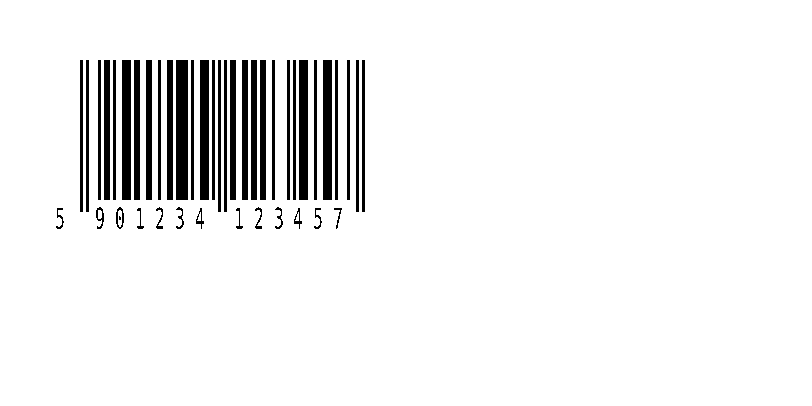
^XA
^BY3,2,140
^FO80,60^BEN,140,Y,N
^FD5901234123450^FS
^XZ
^FD590123412345 (12 digits)
^XA
^BY3,2,140
^FO80,60^BEN,140,Y,N
^FD590123412345^FS
^XZ
Invalid data
- Fewer than 12 digits: nothing is drawn. The OpenZPL API answers
400 Bad RequestwithERROR: EAN-13: need at least 12 digits, got 11. - Letters or symbols: EAN-13 encodes digits only. The engine skips them and counts the digits left:
59012341234Agets the same400and message ("got 11"). Remove them before sending the label. - A real product code: EAN-13 numbers are assigned through GS1. Use a prefix from your GS1 membership; 590123412345 is only an example number.
Check a barcode before printing a run
A preview shows how the printer will draw the code: bar widths, quiet zone and the human-readable line. It does not prove that every scanner reads it on your media. Print one label at the real density and scan it with the scanner your customer or carrier uses; for retail and logistics codes, a barcode verifier grades the print quality.
Questions
Should I send 12 or 13 digits to ^BE?
12. The printer computes the check digit; a 13th digit you send is not used.
Can ^BE print UPC-A?
Use ^BU for UPC-A. A UPC-A number with a leading 0 is the same symbol as an EAN-13.